
The 3 Most Simple Retrospectives
Anyone who regularly holds retrospectives or would like to do so should have a good repertoire of retrospectives to hand. It’s not just about knowing lots of retrospectives. Rather, it is about having a suitable retrospective to hand for every situation.
You can have a retrospective for special occasions such as Easter, Halloween or Christmas, for example. But it is even more important to have suitable retrospectives for different situations your team is in. If your team has been lacking energy lately, you can use the “Battery Retrospective” to investigate this circumstance in more detail. See also: Creative retrospective ideas
But probably the most important and most common case is when you don’t have much time in the stress of everyday life. This is exactly when simple, short and quick retrospectives are important.
And that’s exactly why I’m going to show you 3 retrospectives that, despite their brevity, don’t lose their effectiveness.
🤔
Not sure what retrospectives are and how they help your team? Then start here:
How to do a simple retrospective?
What makes a retrospective simple:
In addition to a crisp retrospective template, there are other influences that make retrospectives quick and easy. With these points, the retro goes faster and the quality increases at the same time:
- #1 Preparation of the retrospective: Clear preparation of a retrospective is very important, especially when things need to happen quickly.
Implementation tip: With a clearly tested retro agenda, you only need to decide on a suitable retro template to be able to maintain a high-quality retro. - #2 Preparation of answers: Not only you, but also your team should be prepared for the retro and know what they want to talk about.
Implementation tip: The easiest way is to ask the team members to answer the questions before the retrospective. This saves time in the retrospective and even improves the quality of the content. - #3 Clear prioritization: If things need to move quickly, you can’t dwell on unimportant points. It is therefore very important to clearly prioritize the points to be discussed during the retrospective.
Implementation tip: First of all, everyone should know what answers there are to the retro questions. Then everyone can select their top 3 answers that they would like to talk about in more detail. The answers that are in the top 3 for most people are also prioritized the highest. - #4 Time limit: Work expands if you allow yourself too much time to complete it. It therefore makes sense to limit the time for subtasks.
Implementation tip: Work with a timer or stopwatch. It may seem unusual at first, but the increased concentration will lead to faster results.
If you only integrate these 4 points into your next retrospective, you will notice how much easier it will be. In our tool “Echometer” we have integrated all these aspects, so that you don’t even have to think about whether you take them into account.
But for now, I’d like to introduce you to 3 simple retrospectives that are hard to beat in terms of brevity, speed and simplicity:
The simplest retrospective in the world:
1. The ‘What Went Well’ Retrospective 👍
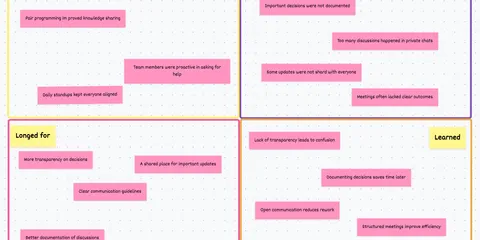
The “What Went Well” retrospective is the simplest and most used retro technique in our tool. It asks the most basic questions of a retrospective in a very understandable way:
What went well Retro 👍: How the retro works
-
Random Icebreaker (2-5 minutes)
Echometer provides you with a generator for random check-in questions.
-
Review of open actions (2-5 minutes)
Before starting with new topics, you should talk about what has become of the measures from past retrospectives to check their effectiveness. Echometer automatically lists all open action items from past retros.
-
Discuss retro topics
Use the following open questions to collect your most important findings. First, everyone does it themselves, covered. Echometer allows you to reveal each column of the retro board individually in order to then present and group the feedback.
- What went well?
- What went not so well?
- How can we improve?
-
Catch-all question (Recommended)
So that other topics also have a place:
- What else would you like to talk about in the retro?
-
Prioritization / Voting (5 minutes)
On the retro board in Echometer, you can easily prioritize the feedback with voting. The voting is of course anonymous.
-
Define actions (10-20 minutes)
You can create a linked action via the plus symbol on a feedback. Not sure which measure would be the right one? Then open a whiteboard on the topic via the plus symbol instead to brainstorm root causes and possible measures.
-
Checkout / Closing (5 minutes)
Echometer enables you to collect anonymous feedback from the team on how helpful the retro was. This creates the ROTI score ("Return On Time Invested"), which you can track over time.
What went well Retro 👍

The fastest retrospective in the world:
2. Health Check Retro: Spotify Squad Health Check 👩🏻💻
In a retrospective, you don’t always have to find complex answers to questions. Health check retrospectives are about ranking different metrics on a scale from “Very Good” to “Bad.”
Within a few minutes you have a clear overview of whether the team is “doing well” in the queried metrics. This makes health check retrospectives like the “Spotify Health Check” one of the fastest retrospectives in the world.


Note: This retrospective format asks for agreement with the given Health Check items on a scale.
- Speed: We get stuff done really quickly. No waiting, no delays.
- Tech Quality: We’re proud of the quality of our code! It is clean, easy to read, and has great test coverage.
- Learning: We’re learning lots of interesting stuff all the time!
- Mission: We know exactly why we are here, and we are really excited about it.
- Other items (customizable)
The shortest retrospective in the world:
3. The ‘Lean Coffee’ Retrospective ☕️
One retrospective, one question and endless possibilities. In the Lean Coffee Retrospective, you can talk about anything your heart desires. Because sometimes no retro template is the best retro template.
Attention: I recommend this retro when there is little time and you want to see if there is something on the team members’ minds. Alternatively, you can use it if certain topics have already been decided in advance and you don’t need specific questions to initiate a discussion.
Nevertheless, use a retrospective for this, as a clear framework and process increases the quality of the conversation.
Open Feedback Questions
What do we want to talk about?

Simple Retrospectives - Conclusion
It doesn’t matter whether it should be a simple, fast or short retrospective. With the 4 tips and 3 retro templates you are optimally prepared for this. If you would like to expand your retro repertoire even more, feel free to try out our tool, where you can test all templates or read this article: 54 fun retrospective methods for agile teams

"Many team members are afraid to speak up!"
Solve this challenge
"We discover too many unexpected issues & bugs at a late stage!"
Solve this challenge
"Why does it sometimes take me hours to prepare a simple retrospective?"
Solve this challenge