
When should a sprint retrospective happen?
If you’ve just searched Google for “When should sprint retrospectives take place”, you probably want one of these two questions answered:
- When in the sprint cycle should sprint retrospectives happen?
- On which day should sprint retrospectives happen?
In this article I will answer both questions. And if you have the feeling that one of the two questions is superfluous, then I would like to convince you of the opposite.
Before we start:
When should a Sprint Retrospective happen
When should sprint retrospectives happen in the sprint cycle?
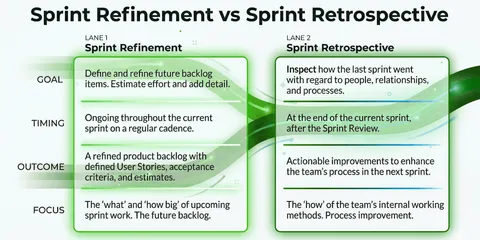
In the Scrum Framework, Sprint Retrospectives are a fixed and important part of each Sprint Cycle. The purpose of the sprint retrospective is to reflect on the past sprint cycle, to learn from it and thus to be able to approach the upcoming sprint cycle better.
Thus, the team should have the sprint retrospective after the sprint review and before the next sprint planning.
A classic sprint cycle lasts between one week and one month. So the Sprint Retrospective also takes place once a week to once a month.
In this regard, we studied over 30,000 retrospectives from more than 100 companies and found that team members’ subjective satisfaction was highest when retrospectives were held at intervals of 14 days or less.

When should a Sprint Retrospective happen
On which day should sprint retrospectives happen?
Even if this question seems much less relevant than the first one, I can assure you that this is not the case. In our data collection of more than 30,000 retrospectives, we also looked at when the best time of the week is to hold a Sprint retrospective. And even though the middle of the week (Tuesday-Thursday) turned out to be the days when most Sprint Retrospectives are held, subjective satisfaction with Sprint Retrospectives is highest on a Friday.


As can be seen, the subjective satisfaction with sprint retrospectives becomes higher the later they occur in the week. (More about the ROTI score)/ We don’t have a scientific explanation for this phenomenon, but I would say it makes sense that the end of a sprint can also be seen as the end of a week. Whereas the end of a sprint at the start of the week seems counterintuitive to me at first. - Who doesn’t like to end their week by completing their tasks?
The interesting thing about this measurement is that the question “On which day should you hold a retro?” seems superfluous at first, but has just as great an influence on subjective perception as the frequency of retrospectives.
If you want to find out more about what we have learned from the 30,000 retrospectives, click here: “Analysis of 30k retros: 4 tips for agile teams
Conclusion: When should a Sprint Retrospective happen?
All in all, it can be said that a sprint retrospective takes place at the end of each sprint cycle, which ideally lasts 14 days or less (7 or 14 days is my recommendation). Optimally, you can start these sprints on a Monday and thus end them with the sprint retrospective on a Friday.
If you want to find out under which conditions your team’s satisfaction is highest, feel free to test our retrospective tool for free …
Sailboat Retro ⛵️: How the retro works
Random Icebreaker (2-5 minutes)
Echometer provides you with a generator for random check-in questions.
Review of open actions (2-5 minutes)
Before starting with new topics, you should talk about what has become of the measures from past retrospectives to check their effectiveness. Echometer automatically lists all open action items from past retros.
Discuss retro topics
Use the following open questions to collect your most important findings. First, everyone does it themselves, covered. Echometer allows you to reveal each column of the retro board individually in order to then present and group the feedback.
- ⚓️ Your anchor: What holds us back?
- 🦈🧊 Your shark/iceberg: Which dangers or obstacles approach us?
- 💨 Your tailwind: What drives us forward?
- 🏝💰 Your paradise: What achievement or milestones are we working towards?
Catch-all question (Recommended)
So that other topics also have a place:
- What else would you like to talk about in the retro?
Prioritization / Voting (5 minutes)
On the retro board in Echometer, you can easily prioritize the feedback with voting. The voting is of course anonymous.
Define actions (10-20 minutes)
You can create a linked action via the plus symbol on a feedback. Not sure which measure would be the right one? Then open a whiteboard on the topic via the plus symbol instead to brainstorm root causes and possible measures.
Checkout / Closing (5 minutes)
Echometer enables you to collect anonymous feedback from the team on how helpful the retro was. This creates the ROTI score ("Return On Time Invested"), which you can track over time.
Sailboat Retro ⛵️