
4 Interesting Document Templates for Sprint Retrospectives
In this article you will get examples of retro templates and reasons why they are so helpful.
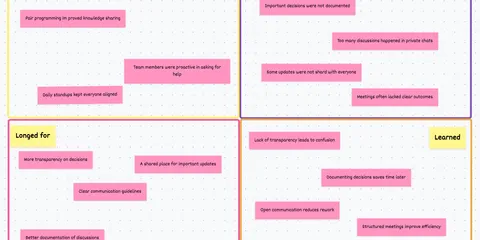
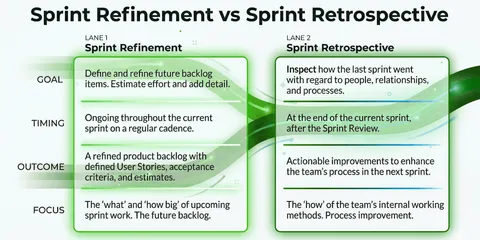
A retrospective is a meeting that usually takes place when a so-called sprint ends. In this meeting, all participants from an agile team meet and have a debriefing about how the last sprint went and what can be learned from it. This meeting is an essential part of agile practices and aims to continuously improve the team and the current project.
To make such meetings easy to run, retrospective templates are a popular tool.
Document templates for sprint retrospectives
The Advantages Of Retrospective Templates
Using a template for your sprint retrospectives can have many benefits. Some of them are:
- Quick preparation: It’s clear that you can prepare a retrospective meeting faster if you use a template instead of reinventing the wheel every time. With the amount of templates that are now available, you’ll always have the right retro for any occasion.
- Clear conversation guide: I often find myself talking about God and the world in a meeting when it’s not crystal clear what the topic is. To prevent this, templates and tools for retros are a great remedy.
- Everything included, nothing forgotten: Following on directly from the previous point, there is the advantage that with a template no important questions are forgotten in the heat of the moment or previously recorded points are not taken into account.
- All are heard: Especially the introverted and quiet candidates of a team are less likely to get a word in edgewise. A template with a pre-screening ensures that everyone is heard.
Document templates for sprint retrospectives
The moment you’ve probably been waiting for has arrived. Here is an excerpt from the most popular retro templates:
1. Start Stop Keep Retrospective👍 👎
Let’s start with a classic. Namely, the start-stop-keep retro. In this one, three simple questions are asked about what to start, stop, and keep in the next sprint cycle.
Secret tip: Make it the “Keep-Stop-Start” retrospective. - We have found that the question “What should be kept?” is the easiest question to get into the retro:
Keep stop start retro: How the retro works
-
Random Icebreaker (2-5 minutes)
Echometer provides you with a generator for random check-in questions.
-
Review of open actions (2-5 minutes)
Before starting with new topics, you should talk about what has become of the measures from past retrospectives to check their effectiveness. Echometer automatically lists all open action items from past retros.
-
Discuss retro topics
Use the following open questions to collect your most important findings. First, everyone does it themselves, covered. Echometer allows you to reveal each column of the retro board individually in order to then present and group the feedback.
- Keep: What should we keep?
- Stop: What should we stop doing?
- Start: What should we start doing?
-
Catch-all question (Recommended)
So that other topics also have a place:
- What else would you like to talk about in the retro?
-
Prioritization / Voting (5 minutes)
On the retro board in Echometer, you can easily prioritize the feedback with voting. The voting is of course anonymous.
-
Define actions (10-20 minutes)
You can create a linked action via the plus symbol on a feedback. Not sure which measure would be the right one? Then open a whiteboard on the topic via the plus symbol instead to brainstorm root causes and possible measures.
-
Checkout / Closing (5 minutes)
Echometer enables you to collect anonymous feedback from the team on how helpful the retro was. This creates the ROTI score ("Return On Time Invested"), which you can track over time.
Keep stop start retro

Document templates for sprint retrospectives
2. DAKI / Drop Add Keep Improve Retrospective:
In this retrospective, we now have 4 questions instead of 3. Retrospectives with more than 3 questions, are usually a bit longer, but can provide interesting insights due to the additional perspective on the last sprint.
So ideal for smaller teams ( Here you can find a detailed article about the DAKI retrospective ):
DAKI Retro: How the retro works
-
Random Icebreaker (2-5 minutes)
Echometer provides you with a generator for random check-in questions.
-
Review of open actions (2-5 minutes)
Before starting with new topics, you should talk about what has become of the measures from past retrospectives to check their effectiveness. Echometer automatically lists all open action items from past retros.
-
Discuss retro topics
Use the following open questions to collect your most important findings. First, everyone does it themselves, covered. Echometer allows you to reveal each column of the retro board individually in order to then present and group the feedback.
- Drop: What should we drop?
- Add: What should we add?
- Keep: What should we keep?
- Improve: What should we improve?
-
Catch-all question (Recommended)
So that other topics also have a place:
- What else would you like to talk about in the retro?
-
Prioritization / Voting (5 minutes)
On the retro board in Echometer, you can easily prioritize the feedback with voting. The voting is of course anonymous.
-
Define actions (10-20 minutes)
You can create a linked action via the plus symbol on a feedback. Not sure which measure would be the right one? Then open a whiteboard on the topic via the plus symbol instead to brainstorm root causes and possible measures.
-
Checkout / Closing (5 minutes)
Echometer enables you to collect anonymous feedback from the team on how helpful the retro was. This creates the ROTI score ("Return On Time Invested"), which you can track over time.
DAKI Retro

Document templates for sprint retrospectives
3. Three Little Pigs Retrospective: 🐷
The fable of the same name served as inspiration for this retrospective. In it, three little pigs build different shelters to protect themselves from the big bad wolf. Now the question is: What exactly does your team’s “shelter” consist of?:
Three Little Pigs Retro 🐷: How the retro works
-
Random Icebreaker (2-5 minutes)
Echometer provides you with a generator for random check-in questions.
-
Review of open actions (2-5 minutes)
Before starting with new topics, you should talk about what has become of the measures from past retrospectives to check their effectiveness. Echometer automatically lists all open action items from past retros.
-
Discuss retro topics
Use the following open questions to collect your most important findings. First, everyone does it themselves, covered. Echometer allows you to reveal each column of the retro board individually in order to then present and group the feedback.
- House of straw: What do we do that is just holding together, but could topple over at any moment? 🌱
- House of sticks: What do we do that is relatively stable, but could be improved?\n 🪵
- House of bricks: What do we do that is rock solid? 🪨
-
Catch-all question (Recommended)
So that other topics also have a place:
- What else would you like to talk about in the retro?
-
Prioritization / Voting (5 minutes)
On the retro board in Echometer, you can easily prioritize the feedback with voting. The voting is of course anonymous.
-
Define actions (10-20 minutes)
You can create a linked action via the plus symbol on a feedback. Not sure which measure would be the right one? Then open a whiteboard on the topic via the plus symbol instead to brainstorm root causes and possible measures.
-
Checkout / Closing (5 minutes)
Echometer enables you to collect anonymous feedback from the team on how helpful the retro was. This creates the ROTI score ("Return On Time Invested"), which you can track over time.
Three Little Pigs Retro 🐷

Document templates for sprint retrospectives
4. The Campfire Retrospective:🔥
Who doesn’t like to sit by a cozy fire and think about the past and the future? - I wouldn’t recommend starting a fire in the office or home office, but that’s exactly why we created a nice campfire retrospective:
Campfire Retrospective 🔥: How the retro works
-
Random Icebreaker (2-5 minutes)
Echometer provides you with a generator for random check-in questions.
-
Review of open actions (2-5 minutes)
Before starting with new topics, you should talk about what has become of the measures from past retrospectives to check their effectiveness. Echometer automatically lists all open action items from past retros.
-
Discuss retro topics
Use the following open questions to collect your most important findings. First, everyone does it themselves, covered. Echometer allows you to reveal each column of the retro board individually in order to then present and group the feedback.
- Warm fire: What made you feel good in the last sprint?
- Turned to ashes: What did not work as desired and crumbled to ashes?
- The shooting star: What do you wish for the future?
-
Catch-all question (Recommended)
So that other topics also have a place:
- What else would you like to talk about in the retro?
-
Prioritization / Voting (5 minutes)
On the retro board in Echometer, you can easily prioritize the feedback with voting. The voting is of course anonymous.
-
Define actions (10-20 minutes)
You can create a linked action via the plus symbol on a feedback. Not sure which measure would be the right one? Then open a whiteboard on the topic via the plus symbol instead to brainstorm root causes and possible measures.
-
Checkout / Closing (5 minutes)
Echometer enables you to collect anonymous feedback from the team on how helpful the retro was. This creates the ROTI score ("Return On Time Invested"), which you can track over time.
Campfire Retrospective 🔥

Of course, we have many more templates up our sleeve. Try them out by testing our tool or have a look at this article: 26 Refreshing Agile Retrospective Templates
Document templates for sprint retrospectives
How to Use a Sprint Retrospective Template Properly.
Using one of these templates is quite simple. Just choose a template that fits your team and the current situation. Feel free to take a screenshot of our templates or just use them with a mouse click in our tool.
Once you have decided on a suitable template, it is important that you professionally incorporate it into a retro agenda and document it accordingly during the reto.
I have created the following blogposts for these topics:
👉 Easy to Use Sprint Retrospective Agenda Template
👉 3 Tips + Templates for Agile Process Documentation
Document templates for sprint retrospectives
Conclusion
All in all, retrospective templates are a “must have” for every team that uses retrospectives. ‘It helps to prepare the retrospective faster and to lead it more precisely and ensures that in the end everyone is equipped with suitable new measures for the sprint. With all the variations that are now available in terms of templates, it shouldn’t be a problem to find the right one for you. 😊