
Sprint Retrospective: Sample Answers and Questions for Teams
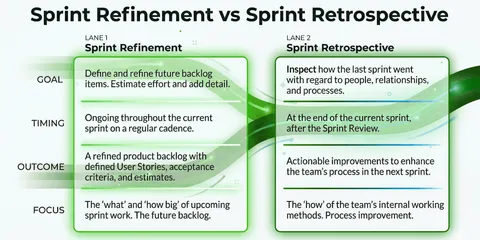
Sprint retrospectives are a core part of Scrum: the team comes together at the end of a sprint, reflects on the collaboration, and agrees on concrete improvements for the next sprint. Good questions alone are not always enough for that. Sample answers make it easier to formulate observations clearly and derive actionable measures from them.
The importance of honest feedback
Tips for promoting open communication
Honest feedback is the foundation for effective collaboration and continuous improvement. For team members to speak openly in the sprint retrospective, they need to feel safe. The greater the fear of judgment, the less often problems are raised. These three approaches promote psychological safety:
Create a relaxed and trusting environment:
- The atmosphere helps determine whether people bring up sensitive topics. So observe how the team responds to mistakes, conflicts, and time pressure. If difficult situations are resolved together and objectively, trust grows. If they are associated with blame or tension, team members will be more likely to keep problems to themselves in the future.
The role model function of managers (lead by example):
- Team members take their cue from how leaders handle difficult situations. Anyone who openly addresses their own mistakes and learns from them constructively shows the team that it is safe to do the same.
For example, when asked “What didn’t go so well?”, first take responsibility for one of your own mistakes. Briefly describe what happened, what you learned from it, and what next step you are taking.
Anonymous feedback options:
- Anonymous feedback often helps make topics visible that would otherwise remain unspoken. Even if it cannot initially be assigned to a person, it creates awareness of a possible underlying issue.
Then discuss together why this feedback was submitted anonymously. That way, the team can address the root causes and create more openness step by step.
A culture of safety and trust does not emerge overnight. But when teams can speak openly about mistakes, conflicts, and uncertainties, retrospectives become much more useful and improvements more sustainable.
Engineering Lead Jean-Sebastian Carle explains how to avoid very quiet retrospectives in the following video:
Sample retrospective questions and answers
The following questions help teams reflect on collaboration during the sprint. The sample answers show how an observation can turn into a concrete next step:
The What Went Well retrospective
What went well Retro 👍: How the retro works
Random Icebreaker (2-5 minutes)
Echometer provides you with a generator for random check-in questions.
Review of open actions (2-5 minutes)
Before starting with new topics, you should talk about what has become of the measures from past retrospectives to check their effectiveness. Echometer automatically lists all open action items from past retros.
Discuss retro topics
Use the following open questions to collect your most important findings. First, everyone does it themselves, covered. Echometer allows you to reveal each column of the retro board individually in order to then present and group the feedback.
- What went well?
- What went not so well?
- How can we improve?
Catch-all question (Recommended)
So that other topics also have a place:
- What else would you like to talk about in the retro?
Prioritization / Voting (5 minutes)
On the retro board in Echometer, you can easily prioritize the feedback with voting. The voting is of course anonymous.
Define actions (10-20 minutes)
You can create a linked action via the plus symbol on a feedback. Not sure which measure would be the right one? Then open a whiteboard on the topic via the plus symbol instead to brainstorm root causes and possible measures.
Checkout / Closing (5 minutes)
Echometer enables you to collect anonymous feedback from the team on how helpful the retro was. This creates the ROTI score ("Return On Time Invested"), which you can track over time.
What went well Retro 👍

The What-Went-Well retro consists of three simple questions:
What went well?👍🏽
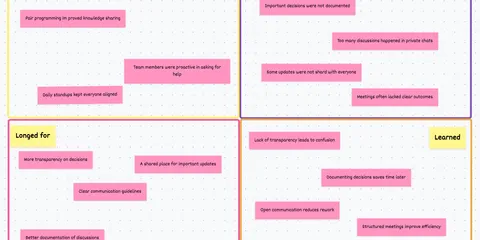
When the team is currently in a good flow: “The new tool for our product backlog made priorities and dependencies transparent. In the daily, we no longer had to wonder what we would work on next. We therefore want to keep using it.”
When collaboration has improved: “When we ran into the checkout bug, three of us got on a call for an hour. After that, the error was narrowed down and nobody had to solve the problem alone. That quick huddle worked really well.”
What didn’t work so well? 👎🏽
When the team lacks transparency: “We haven’t looked at our velocity together over the last three sprints. That’s why the discussion about our planning only came up when the sprint was almost over. In the next sprint, we’ll review it in the review and discuss larger deviations.”
When handoffs are slowing things down: “The ticket was fully developed on Tuesday, but then sat in ‘Ready for testing’ until Friday. We should spot earlier when tests are piling up, instead of noticing the handoff only at the end of the sprint.”
More info: agile metrics.
How can we improve? 🙌🏽
When quiet voices get drowned out: “Not all team members bring their perspective into the retro. That’s why we are introducing a quiet writing phase first in the next three retros. This way, everyone can jot down their thoughts before the loudest voices shape the discussion.”
If the sprint had too many interruptions: “Support requests kept pulling us away from our work this week. We set a rotating support window every day so the rest of the team can work focused toward the sprint goal.”
More info: psychological safety and Team Health Check in three steps.
Further resources and templates
Of course, we also have other retrospectives on offer. Here are a few examples:
Sprint retrospective sample answers
Team Commitments Retrospective
The current challenges require exceptional teamwork. Check whether your team is pulling together with this retro:
🤝Retro for Reflecting and Defining Team Commitments: How the retro works
Random Icebreaker (2-5 minutes)
Echometer provides you with a generator for random check-in questions.
Review of open actions (2-5 minutes)
Before starting with new topics, you should talk about what has become of the measures from past retrospectives to check their effectiveness. Echometer automatically lists all open action items from past retros.
Health Check
All team members can answer the health checks anonymously on a scale. Then go through the results of the health checks together and record any additional comments if necessary. If you use the same health checks in several retrospectives, you can also track trends over time in Echometer.
- As a team, we share a common understanding of what "good work" is.
Discuss retro topics
Use the following open questions to collect your most important findings. First, everyone does it themselves, covered. Echometer allows you to reveal each column of the retro board individually in order to then present and group the feedback.
- Handling of contradictory priorities: ‘When I encounter contradictory priorities, I …’
- Communication of blockers: ‘When I am stuck on a task, I announce this by …’
- Navigation of conflicts: ‘When I notice a conflict start to build up in our team, I …’
Catch-all question (Recommended)
So that other topics also have a place:
- What else would you like to talk about in the retro?
Prioritization / Voting (5 minutes)
On the retro board in Echometer, you can easily prioritize the feedback with voting. The voting is of course anonymous.
Define actions (10-20 minutes)
You can create a linked action via the plus symbol on a feedback. Not sure which measure would be the right one? Then open a whiteboard on the topic via the plus symbol instead to brainstorm root causes and possible measures.
Checkout / Closing (5 minutes)
Echometer enables you to collect anonymous feedback from the team on how helpful the retro was. This creates the ROTI score ("Return On Time Invested"), which you can track over time.
🤝Retro for Reflecting and Defining Team Commitments
Health Check Questions (Scale)
Open questions

Sample responses for the Team Commitments Retro
Dealing with conflicting priorities:
- “When I notice conflicting priorities, I bring them up in the Daily right away and get a decision from the responsible person before starting the work. That way, we don’t work in parallel on two topics of different importance.”
- “When the sales request came up on Wednesday in addition to the release, I didn’t just take it on. We made it visible in the Slack channel and decided together that the release takes priority.”
Communicating blockers:
- “If I get stuck on a task, I mark it as blocked on the board and briefly write in the team chat what I need. After one working day at the latest, I actively ask for support.”
- “For the new interface, I was missing a test account. Instead of waiting three days for an answer, after the Daily I wrote: ‘I’m blocked — who can help me with access for 15 minutes today?’”
Dealing with conflict:
- “When I notice a conflict is emerging, I seek a direct conversation with the person involved as soon as possible. First we describe our observations, and then we decide together what we want to change.”
- “After the tense Planning, I didn’t keep arguing in the group chat. We sat down together one-on-one and realized that we had different assumptions about the deadline.”
Sprint retrospective sample answers
Psychological safety Retro
Especially in tough times, low-conflict collaboration is crucial. But for this to happen, everyone must dare to talk about points of friction before they escalate. Having the security in the team to be able to express oneself at all times is also known as “psychological safety”. See how things are with you on this topic:
Psychological safety Health Check: How the retro works
Random Icebreaker (2-5 minutes)
Echometer provides you with a generator for random check-in questions.
Review of open actions (2-5 minutes)
Before starting with new topics, you should talk about what has become of the measures from past retrospectives to check their effectiveness. Echometer automatically lists all open action items from past retros.
Health Check
All team members can answer the health checks anonymously on a scale. Then go through the results of the health checks together and record any additional comments if necessary. If you use the same health checks in several retrospectives, you can also track trends over time in Echometer.
- I regularly receive useful feedback on how good my performance is and how I can improve.
- If a team member makes a mistake, they are not judged for it.
- You're allowed to not know things in our team.
- In conflicts, we talk on a factual level, so that no one feels personally attacked or judged.
Discuss retro topics
Use the following open questions to collect your most important findings. First, everyone does it themselves, covered. Echometer allows you to reveal each column of the retro board individually in order to then present and group the feedback.
- What else do we want to talk about?
Catch-all question (Recommended)
So that other topics also have a place:
- What else would you like to talk about in the retro?
Prioritization / Voting (5 minutes)
On the retro board in Echometer, you can easily prioritize the feedback with voting. The voting is of course anonymous.
Define actions (10-20 minutes)
You can create a linked action via the plus symbol on a feedback. Not sure which measure would be the right one? Then open a whiteboard on the topic via the plus symbol instead to brainstorm root causes and possible measures.
Checkout / Closing (5 minutes)
Echometer enables you to collect anonymous feedback from the team on how helpful the retro was. This creates the ROTI score ("Return On Time Invested"), which you can track over time.
Psychological safety Health Check
Health Check Questions (Scale)
Open questions

Sample responses for psychological safety
What else do we want to talk about?
- “In the last few refinements, some follow-up questions were only asked after the session. Before estimation, let’s deliberately schedule a short Q&A round.”
- “I’d like to talk about the mood after the incident. In the call, we quickly found a solution, but afterward I had the feeling that we were blaming each other.”
The scale makes differences within the team visible. These sample comments help make a vote of ‘Strongly disagree’ or ‘Strongly agree’ more tangible:
“I regularly receive useful feedback about how well I am doing and how I can improve.”
- Strongly disagree: “I usually only find out in the annual review whether my work meets expectations. During the last release, I didn’t know until the very end whether my approach to monitoring was helpful or just created extra work.”
- Strongly agree: “After our pairing, Lea told me right away that my debugging notes had helped her — and showed me how I could make them even clearer next time. That was concrete, and I could apply it immediately.”
“If someone on our team makes a mistake, they are not judged for it.”
- Strongly disagree: “When the feature had to be rolled back, the channel immediately said: ‘Who approved that?’ Since then, I think twice before raising a concern in a review.”
- Strongly agree: “When the feature flag was missing, we didn’t look for someone to blame. We retraced together how it could have happened and added a check to our release checklist.”
“It’s okay not to know something in our team.”
- Strongly disagree: “During the architecture decision, I nodded even though I didn’t understand the difference between the two caching options. I didn’t want to be the person holding up the process again.”
- Strongly agree: “When I was new to the team, I asked what exactly our deployment script does. Instead of brushing the question off, Tom scheduled a short session and documented the explanation right away.”
“In conflicts, we talk about the issue itself so no one feels personally attacked or judged.”
- Strongly disagree: “In the discussion about the technical solution, someone said: ‘You always make it unnecessarily complicated.’ After that, it was no longer about the solution for me, but about defending myself.”
- Strongly agree: “We disagreed on the API solution. Both sides explained their risks, we wrote them down, and then decided on the version with the lower rollback effort. Nobody had to be right.”
Sprint retrospective sample answers
Battery Retrospective
Difficult times also put a strain on personal batteries. It is particularly important now to keep an eye on the team’s energy levels:
Battery retrospective: How the retro works
Random Icebreaker (2-5 minutes)
Echometer provides you with a generator for random check-in questions.
Review of open actions (2-5 minutes)
Before starting with new topics, you should talk about what has become of the measures from past retrospectives to check their effectiveness. Echometer automatically lists all open action items from past retros.
Discuss retro topics
Use the following open questions to collect your most important findings. First, everyone does it themselves, covered. Echometer allows you to reveal each column of the retro board individually in order to then present and group the feedback.
- How full is your personal battery as a percentage right now?
- What has drained your battery recently?
- What has recharged your battery recently?
- What would help you to save energy over the next few weeks?
Catch-all question (Recommended)
So that other topics also have a place:
- What else would you like to talk about in the retro?
Prioritization / Voting (5 minutes)
On the retro board in Echometer, you can easily prioritize the feedback with voting. The voting is of course anonymous.
Define actions (10-20 minutes)
You can create a linked action via the plus symbol on a feedback. Not sure which measure would be the right one? Then open a whiteboard on the topic via the plus symbol instead to brainstorm root causes and possible measures.
Checkout / Closing (5 minutes)
Echometer enables you to collect anonymous feedback from the team on how helpful the retro was. This creates the ROTI score ("Return On Time Invested"), which you can track over time.
Battery retrospective

Sample answers for the battery retrospective
How full is your personal battery as a percentage right now?
- “My battery is at about 60 percent. I can handle my tasks well, but I notice that the many parallel alignments are increasingly draining me.”
- “I’m at 25 percent right now. The production incident over the weekend and the two sick-covering substitutions are still weighing on me.”
- “I’m at 85 percent. The new topic motivates me, and I had enough uninterrupted time this week to get familiar with it.”
What has drained your battery recently?
- “The short-notice context switches between support, bug fixes, and the sprint goal cost me a lot of energy. As a result, I could hardly work on one task with focus.”
- “The daily uncertainty about whether the release would take place exhausted me more than the work itself. Every evening I waited for a decision and then scrapped my planning again.”
What has recharged your battery recently?
- “The joint pairing on the complex bug was motivating: We quickly narrowed down the problem, and I was able to learn something new in the process.”
- “Being able to hear the user feedback directly in the review showed me again why the small improvement was important. That really motivated me after a tough week.”
What would help you to save energy over the next few weeks?
- “A fixed focus block without meetings on two mornings per week would help me. During that time, I want to work only on the sprint tasks and handle support requests afterward in a bundle.”
- “For holiday coverage, I need a clear list: What is really urgent, who decides on follow-up questions, and what can wait until I return? Then I won’t go into time off with an open mind.”
More formats can be found in our collection: 33 simple examples for retrospectives.
A clear structure helps to take concrete next steps from each retro. With Echometer, you can prepare a retrospective in just a few minutes and record measures for the next sprint.
Just try it out for free: