
Should I use whiteboard tools for retrospectives?
You want to run a retrospective and use a whiteboard tool for it? - Then you’ve come to the right place.
We will shed light on whether and when whiteboard tools are suitable for retrospectives. We will look at the advantages and disadvantages of whiteboard tools and explore whether the providers “Miro” or “Mural” are good retro tools.
Should I use whiteboard tools for retrospectives?
(When) Are whiteboard tools used for retrospectives?
Basically, you can say that whiteboard tools such as Miro and Mural are popular tools for retrospectives and are used accordingly. But before you blindly start holding your retrospectives with a whiteboard tool, you should be aware of the advantages, disadvantages and alternatives:
Advantages of whiteboard tools in retrospectives:
The popularity of whiteboard tools doesn’t come from nowhere. Here are the biggest advantages at a glance:
- Habit: We are already familiar with working with whiteboards from the past. The basic idea comes from physical whiteboards, which have been used since time immemorial.
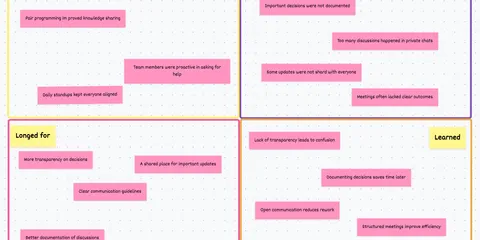
- Versatility: With a blank whiteboard, a (digital) pen and a few sticky notes, you can put together just about anything.
- Digital advantages: In addition to the advantages of a whiteboard, digital tools offer benefits such as: Templates, storage options, remote access, integrations, etc.
Disadvantages of whiteboard tools in retrospectives:
Whiteboard tools therefore offer a high degree of flexibility and can be used for many applications. However, this flexibility results in disadvantages that can be particularly disruptive for retrospective applications:
- Clutter: Particularly with large boards with lots of sticky notes, the collected data can quickly become unstructured and make work more difficult.
- Complexity: A tool for EVERYTHING quickly becomes a tool for NOTHING. Many functions and options that are not relevant for retrospectives weaken the quality.
- Framelessness: The lack of a framework makes the preparation, implementation and moderation of a retrospective more difficult.
So if your retros with whiteboard tools are hampered by confusion and operating problems, a tool specially developed for retrospectives such as Echometer is certainly a promising alternative for you.
Should I use whiteboard tools for retrospectives?
If your team is already used to Mural or Miro and is familiar with the tool, it may also make sense to use this whiteboard tool for retrospectives.
However, if your team is struggling with the constantly growing range of functions of Miro and Mural, it would be a good option to look for a tool dedicated to retrospectives.
Retro tools offer the following advantages over whiteboard tools such as Miro or Mural:
- Significantly less preparation time thanks to customizable retro template library
- Simpler moderation thanks to clear guidelines and retro steps
- Pre-surveys for clearer feedback and time savings in the team
- Whiteboards as a sub-function for break-out sessions
- Many other features that are optimized for retrospectives
So if you are looking for an optimal tool for smooth retrospectives and would like to try out such a tool, you can test Echometer for free with more than 50 retro templates here:
Alternatively, you can also take a look at our comparison of different Reto tools here: Retro Tool Comparison
Example retro template without whiteboard in Echometer: Psychological safety
Psychological safety Health Check: How the retro works
Random Icebreaker (2-5 minutes)
Echometer provides you with a generator for random check-in questions.
Review of open actions (2-5 minutes)
Before starting with new topics, you should talk about what has become of the measures from past retrospectives to check their effectiveness. Echometer automatically lists all open action items from past retros.
Health Check
All team members can answer the health checks anonymously on a scale. Then go through the results of the health checks together and record any additional comments if necessary. If you use the same health checks in several retrospectives, you can also track trends over time in Echometer.
- I regularly receive useful feedback on how good my performance is and how I can improve.
- If a team member makes a mistake, they are not judged for it.
- You're allowed to not know things in our team.
- In conflicts, we talk on a factual level, so that no one feels personally attacked or judged.
Discuss retro topics
Use the following open questions to collect your most important findings. First, everyone does it themselves, covered. Echometer allows you to reveal each column of the retro board individually in order to then present and group the feedback.
- What else do we want to talk about?
Catch-all question (Recommended)
So that other topics also have a place:
- What else would you like to talk about in the retro?
Prioritization / Voting (5 minutes)
On the retro board in Echometer, you can easily prioritize the feedback with voting. The voting is of course anonymous.
Define actions (10-20 minutes)
You can create a linked action via the plus symbol on a feedback. Not sure which measure would be the right one? Then open a whiteboard on the topic via the plus symbol instead to brainstorm root causes and possible measures.
Checkout / Closing (5 minutes)
Echometer enables you to collect anonymous feedback from the team on how helpful the retro was. This creates the ROTI score ("Return On Time Invested"), which you can track over time.
Psychological safety Health Check
Health Check Questions (Scale)
Open questions