
Design retrospectives - avoid misunderstandings in communication

Correctly designing retrospectives is particularly important when working in a team, as they offer an optimal basis for exchange within the team, but at the same time are not a sure-fire success. Communication between the participants is a particularly important aspect.

Just recently I had a private situation in which I noticed how quickly you can misunderstand.
A friend of mine, Ben, had borrowed a charging cable from me, which belongs to another friend, Leon. When I wanted to give it back to Leon, I asked my friend Ben if he could bring it over to me. He just couldn’t and offered to give it directly to Leon. Since I wanted to hand it over myself, I said to him: “No, everything’s fine, you don’t need that. Just give it to me when. ”

The next day, the message from Ben arrived: “I dropped it in Leon’s mailbox.” and I wondered what that was about, since I - in my opinion - had explicitly said that he should give it to me directly.

And the moral of the story: Ben just wanted to do me a favor and thought I said that so as not to bother him.

This shows that there can be different interpretations in communication and misunderstandings can arise. 
For this reason in particular, it is essential to design retrospectives in such a way that they uncover misunderstandings from everyday life and create them by creating common ones mental models even avoided in advance in order to be able to act efficiently as a team.

In teams where several participants communicate via different channels such as email, phone or messenger like Slack & Co., the potential of misunderstandings can quickly increase. The retrospective creates a protected space to bring the team back to a stand. This is why retrospectives are particularly relevant in such teams.

Create retrospective Success factor for communication


But what is the definition of a retrospective? Basically, a retrospective can be defined as follows: A retrospective is a regular meeting of a team to illuminate the past work steps and, based on them, to derive suggestions for improvement for future cooperation. You can find more details in our FAQ here.

And how is a retrospective structured? Of course, the design of the retrospective has to be adapted to the respective needs of the team, but there is still a certain basic structure or retrospective methods that should be used.

There are several askThat should be kept in mind in a retrospective in order to optimize the work process, improve communication and avoid misunderstandings, or at least uncover them:

  1. What have we done so well that we have to talk about it so as not to forget it?
  2. What insights have we gained?
  3. What will we have to do differently in the future?
  4. What have we not understood?

Phases to design your retrospective 


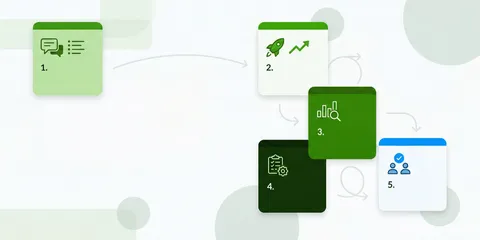
Basically, retrospectives can be divided into several phases split, which are divided as illustrated in the figure:

Now you’re wondering what exactly that should tell you? Of course, we will tell you this and how you can design your retrospective below!

  • Intro: The intro includes greeting and capturing the current mood. This can be done, for example, via a short check-in, in which everyone reports on how he or she is currently doing.
  • Data collection: In the data collection you should collect information that enables you to assess your cooperation. These can be objective facts as well as your personal impressions. 
  • Gaining insight: This is about determining the causes. Why is something going well or not going well? The above questions can help you. 
  • Determine measures: In this phase, concrete steps should be decided, responsibilities distributed and a time schedule determined.
  • Conclusion: At the end you should evaluate the retrospective yourself and give feedback on it. This will help you optimize the next retrospectives. Here you can our Team retrospective tool may be helpful. Cooperation is reflected on with targeted items and a common consensus is created. 

Use retrospective tools

By the way, retrospective tools can of course help with the design and moderation of your retrospective (see our list of  14 retro tools in comparison ). 

 In particular, I want to mention the retrospective tool Echometer name, which I helped to develop myself. It combines insights from psychology with agile best practices to get the most out of team health checks & retros for team development. 


You can design a retrospective without a login from you or your team - the tool takes care of the entire structuring and helps with timeboxing etc.

You can use this button to open the tool, choose your retrospective questions and invite the team via a link (there are  more than 30 kickass retrospective  ideas available):

When you get to the end of the retro, if you want to, you can create a free account to save your results.

If you would like to learn more beforehand or start a proper trial directly - right here or start for free.

Avoid misunderstandings in communication


Let’s go back to my initial story: What do misunderstandings and communication have to do with the design of retrospective methods?


As you can easily see from the phases and relevant questions, designing retrospectives depends on communicating with each other and working on common processes. As in other everyday situations, this can lead to misunderstandings. Therefore, it makes sense to take a look at communication models to raise awareness of the causes of misunderstandings.


Basically, it is relevant to remember that every statement 4 pages (see Schulz von Thun, 1981) has:

The four-sides model - a very well-known communication model - helps to understand why so many interpretations of a supposedly clear statement are possible.
If you take this into account in the retrospectives, you will surely be able to quickly uncover why there have been some misunderstandings in the past work.

Especially in the agile world of work, it is important that successful communication takes place so that you can meet the dynamic requirements of VUCA World can react promptly and appropriately.

Design the communication square for the retrospective


Always try to learn to not just accept statements made in all phases of the retrospective. Instead, questions and considers all four sides of the communication square. Ask for so long and paraphrase your counterpart’s statement (so summarize it in your own words) to see if you mean the same thing.


In the beginning this will surely seem strange to you at first. Over time, however, you will notice that misunderstandings can be avoided and uncovered and processes run more smoothly.

Design Echometer as support for the retrospective


At Echometer, we understand how to transform TeamWork and promote it in the long term. With the help of psychological know-how and ours Team retrospective tool We have developed for teams like your optimally tailored items that ensure that you ask the right questions and come to a common denominator in order to optimize your communication and avoid misunderstandings.

References


Friedemann Schulz von Thun: Talking to Each Other 1 - Disruptions and Clarifications. General psychology of communication, Rowohlt, Reinbek 1981, ISBN 3-499-17489-8
 

Blog category

More articles on "Tips for retros"

View all articles in this category
The 7 Best Retro Tools for Agile Teams (2026)

The 7 Best Retro Tools for Agile Teams (2026)

Discover the 7 best retro tools for agile teams in 2026! Our comprehensive comparison will help you find the ideal retrospective tool for your team.

10 Tips for Great Retrospective Action Items incl. Examples

10 Tips for Great Retrospective Action Items incl. Examples

How do I derive good actions from retrospectives? 10 tips and examples to help define and implement meaningful actions. For value-adding retros!

5 phases of a retrospective alone are not enough: the Double Diamond model

5 phases of a retrospective alone are not enough: the Double Diamond model

Optimize your retrospectives with the Double Diamond model! Discover how to improve the 5 phases to achieve better results and teamwork.

42 Fun & Creative Retrospective Icebreakers breaking any Ice

42 Fun & Creative Retrospective Icebreakers breaking any Ice

Discover 42 creative retrospective check-ins and icebreakers for agile teams. Find the best questions and methods to make every retro interactive.

10 Simple & Important Agile Retrospective Ground Rules

10 Simple & Important Agile Retrospective Ground Rules

Agile Retrospectives: 10 Simple Rules for Effective Teamwork. Create a safe environment, encourage honesty, and focus on solutions.

What are the top-rated online retrospective software tools for agile (scrum) teams?

What are the top-rated online retrospective software tools for agile (scrum) teams?

Which online retrospective tools are best rated by agile (Scrum) teams? A comparison of Echometer, Parabol and others with advantages and disadvantages.

How do I find the right software tool for sprint retrospectives?

How do I find the right software tool for sprint retrospectives?

Which software tool is the best fit for your sprint retrospectives? We compare popular tools like Echometer, EasyRetro, and Metro Retro. Find the right one!

What is the cheapest alternative to the Neatro retrospective software tool?

What is the cheapest alternative to the Neatro retrospective software tool?

Neatro or Echometer: Which retrospective tool is more affordable? A cost and price comparison for agile teams. Discover the best & cheapest alternative!

5 whiteboard templates for brainstorming action items in retrospectives

5 whiteboard templates for brainstorming action items in retrospectives

Discover 5 Whiteboard Templates for Retrospectives to brainstorm actions! Including use cases, examples and tips for your agile team.

Echometer Newsletter

Don't miss updates on Echometer & get inspiration for agile working

FAQs about Retrospective Tool

Top answers for anyone exploring our Retrospective Tool.

What is the ROI of the paid version of Echometer?

Good team retrospectives are a real win for companies. They have a positive impact on productivity, engagement and satisfaction - with Echometer you can tangibly and measurably increase these benefits.

Our data shows that teams achieve an average ROI increase of +120 % per retrospective when using Echometer. The ROI calculation makes all assumptions transparent, so you can enter effects as realistically as possible.

Important levers:

  • Time saving: Retro preparation, live sessions and follow-up are much faster thanks to team templates, retro themes and automated documentation. You can collect feedback asynchronously, use controlled timeboxing and record all measures directly in the tool.
  • Scalability: Your coaching resources are limited? Echometer enables teams to conduct retrospectives independently, helps new moderators get started and gives you a cross-team culture barometer.

With the Echometer ROI calculator, you can calculate exactly what added value you generate for your company - ideal as a basis for decision-making for budget managers or if you want to present the business case.
To the ROI calculator

Is a paid tool for team retrospectives worth it?

Team retrospectives can quickly turn into time-consuming processes if preparation, moderation and follow-up are implemented manually. A paid tool like Echometer helps you to standardize these processes, accelerate them and make them measurably better.

Why the investment is worth it:

  • Reusable Templates & Themes: You don’t have to rebuild retros every time. Instead, proven formats, timeboxing templates and asynchronous feedback are available.
  • Documentation & Measures: Every learning and every action item is automatically recorded. This ensures that knowledge is retained, even when team members change.
  • View of Team Health: Dashboards show trends across teams, allowing you to react seamlessly when issues arise.
  • Scalability & Independence: Teams conduct their own retrospectives, coaches remain focused, and new team members find it easy to get started.

In addition: Echometer delivers standardized ROI calculations. This allows every manager to see in black and white the time savings, productivity gains and cultural improvements achieved by the investment.

Open ROI calculator

Do I have to register to test the Retro Tool?

No, you do not need to log in to Echometer or register to test the Retro Board and Retro Tool in Echometer.

You can try out Echometer’s Retro Board via the following link without logging in: Try a Practice Round

How can I buy Echometer's retro tool?

First, simply register for free in Echometer. Then navigate to the workspace for which you would like to purchase the retro tool. If you haven’t already done so, you can do so here: Create account in Echometer 1:1 tool

You can then manage your subscription (for both the retro tool and the 1:1 software) within the workspace settings.

You can choose from various payment methods when upgrading.

If you do not have access to your company’s credit card yourself, you can simply add a buyer as a workspace admin in your Echometer workspace so that this admin can carry out the upgrade for you.

What is the difference between the Retrospective tool and the 1:1 software?

In Echometer there are two separate software solutions that are available within each workspace in Echometer:

  • 1:1 tool: Software for planning and conducting 1:1 meetings and tracking employee development
  • Retrospective tool: Software for planning and moderating retrospectives and tracking team development through team health checks

Both are independent software solutions, so they can be used separately from each other.

However, they work according to the same principles and aim to achieve the same added value: The continuous improvement of agile teams. In this respect, the simultaneous use of both software solutions is recommended.

Can I appoint several admins in Echometer?

Yes, you can assign administration rights to any number of users at both team level and workspace level. Please note the following:

  • Only workspace admins can take out and manage a Echometer subscription for a Echometer workspace.
  • Only workspace admins can create additional teams and name or remove additional workspace admins.
  • Team admins can appoint and remove additional team admins and team members for their team