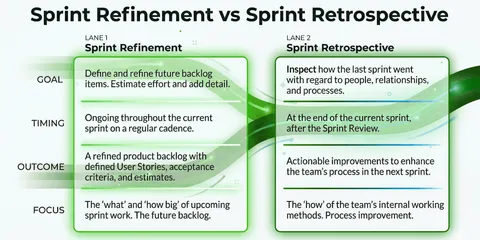

3 Tips + Templates for Agile Process Documentation

Every retrospective needs to be documented in some form. That’s why I’m providing you with the template I use to document retrospectives with my team. This shows how I document things during the retrospective and then how I record the results of my retrospective at the end, so that you can still use it for yourself in the future.

Templates for agile process documentation

A brief overview of a retrospective:

Before we discuss how I document my retrospectives, I would like to give you a brief overview of what a typical retro agenda looks like. After that, we can dive deeper into the individual points of the agenda and look at how to document them correctly. If you would like to learn more about my ideal template for a retro agenda, read this article: “ Easy to Use Sprint Retrospective Agenda Template

The Agenda of a Retro:

1. Retro Checkin: Here, all team members are shaken up once and everyone is included in the retro check once.

2. Action Item Review: In the second step, all action items from the previous sprint are subjected to a short review: Done-Continue-Discard.

3. collecting data: If you haven’t already, all team members can answer the retrospective questions now to talk about later. (If you want to take a look at more than 50+ retrospective templates, click this link).

4. Analyze + Create Action Items: Now take a closer look at the answers to the questions and prioritize them. For the most important questions, you usually develop action items to work on.

Templates for agile process documentation

What needs to be documented in an agile retrospective?

Now that we’ve seen what the key building blocks of retrospective are, we can look at what needs to be documented and how.

1. Retro Check-in: The check-in serves to get the retrospective started. However, it is not important for the rest of the retrospective. Here, it is usually fine to use just a simple whiteboard, post-its, or no documentation at all. You can find check-in or icebreaker ideas in this article: “ 21 Creative Retrospective Check-ins That Will Break Any Ice ”.
This is what a check-in might look like:

2. Review Of The Action Items: In this step, you have usually already documented the relevant action items in the last retrospective, so you can review them now. I personally use our Echometer software for this. However, if you want to do this yourself, I suggest doing it on a canban lane so you can easily see the status of the action.
Usually it is good to talk about these points and clarify if there are any obstacles, if the action point can be done in a short time. In some cases it is also advisable to discard the action item. Don’t hold on too tightly to action items if new information shows that it is not worth investing further time here. Also, be careful with a large product backlog. Although this is a popular mechanism for moving items into the future, the product backlog takes the effectiveness out of agile work.

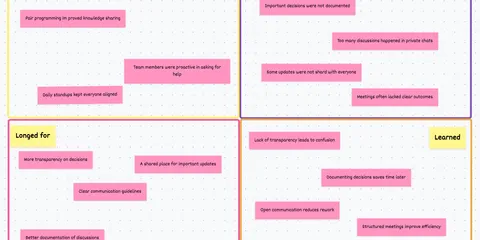
3. collect data: Normally, one arranges the various retrospective questions in columns to which team members can attach their answers. This is usually done in the form of post-its or similar.
Here you have a good overview of all the points to be discussed.
Expert Tip: Have all participants submit their answers to the retro questions a few hours before the retrospective begins. This way, participants will be more thoughtful and open about their points of view.
With Echometer, you can send a simple survey to all participants with the click of a mouse before starting a retrospective.

4. Evaluate + Create Action Items: In the last step, you should leave only the post-its on the whiteboard that you really want to talk about in more detail. You can find out which post-its they are by giving all participants a few choice votes to assign to the post-its.
When you discuss the individual points in more detail, you can even open a new whiteboard to take notes or get a better structure of the things you are discussing. Once you have found common ground and create action items from your most important retro points, it is important that you save them for later so that you can review them in the upcoming retro, as in “Step 2 - Reviewing Action Items”.

Open Feedback Questions

What went well?

What went not so well?

How can we improve?

Templates for agile process documentation

Retrospective Results Document:

Documenting retro results is an important part of the agile process. It helps teams track their progress, identify areas for improvement, and ensure that actions are followed up. One tool that can help with this is Echometer.

Echometer offers several features that can help teams document their retro results. One of them is the Automated Retro Summaries, which allows teams to store and retrieve past retrospectives. This can be useful for tracking progress over time and identifying patterns or recurring issues.

Another useful function are the Health Check Dashboards. These dashboards give teams an overview of their performance and can help identify areas for improvement. Teams can use these dashboards to track their progress and ensure they are meeting their goals.

Finally, Echometer also offers a Action Item Tracking, which teams can use to track the actions resulting from the retrospectives. This ensures that these points are followed up and progress is made.

Overall, Echometer provides teams with a set of tools to document the results of their retrospectives and track their progress.
If you are interested in improving your documentation, you should definitely try it out! 😊

Blog category

More articles on "Agile Retrospective Ideas"

View all articles in this category
54 Fun Retrospective Methods for Agile Teams in 2026

54 Fun Retrospective Methods for Agile Teams in 2026

Discover 54 fun retrospective methods for agile teams in 2026! From classic to creative formats – find the best ideas for your team.

26 Novel Agile Retrospective Templates in 2026

26 Novel Agile Retrospective Templates in 2026

Discover 26 novel Agile Retrospective templates for 2026. Find the best method for your team and make your retrospectives successful.

Spotify Health Check Retrospective: Moderation & Tips

Spotify Health Check Retrospective: Moderation & Tips

Use the Spotify Health Check in retrospectives for team development. This guide offers moderation questions and templates for Team, Tech & Co.

42 Fun & Creative Retrospective Icebreakers breaking any Ice

42 Fun & Creative Retrospective Icebreakers breaking any Ice

Discover 42 creative retrospective check-ins and icebreakers for agile teams. Find the best questions and methods to make every retro interactive.

When should a sprint retrospective happen?

When should a sprint retrospective happen?

When is the best time to hold a sprint retrospective? Find out when in the sprint cycle and on which day the retrospective is most effective.

3 best retrospective questions with online templates

3 best retrospective questions with online templates

Did you just google "3 retrospective questions"? Great, then you've come to the right place🎉 In this article, I want to give you an overview of different retrospective formats that all have one th...

What are the top-rated online retrospective software tools for agile (scrum) teams?

What are the top-rated online retrospective software tools for agile (scrum) teams?

Which online retrospective tools are best rated by agile (Scrum) teams? A comparison of Echometer, Parabol and others with advantages and disadvantages.

How do I find the right software tool for sprint retrospectives?

How do I find the right software tool for sprint retrospectives?

Which software tool is the best fit for your sprint retrospectives? We compare popular tools like Echometer, EasyRetro, and Metro Retro. Find the right one!

2 tips for the DAKI retrospective incl. examples

2 tips for the DAKI retrospective incl. examples

DAKI Retrospective Made Easy: What Does Drop Add Keep Improve Mean? 2 Tips for Agile Coaches & Scrum Masters, Examples, and the Difference from the KALM Retro.

Echometer Newsletter

Don't miss updates on Echometer & get inspiration for agile working

FAQs about Retrospective Tool

Top answers for anyone exploring our Retrospective Tool.

What is the ROI of the paid version of Echometer?

Good team retrospectives are a real win for companies. They have a positive impact on productivity, engagement and satisfaction - with Echometer you can tangibly and measurably increase these benefits.

Our data shows that teams achieve an average ROI increase of +120 % per retrospective when using Echometer. The ROI calculation makes all assumptions transparent, so you can enter effects as realistically as possible.

Important levers:

  • Time saving: Retro preparation, live sessions and follow-up are much faster thanks to team templates, retro themes and automated documentation. You can collect feedback asynchronously, use controlled timeboxing and record all measures directly in the tool.
  • Scalability: Your coaching resources are limited? Echometer enables teams to conduct retrospectives independently, helps new moderators get started and gives you a cross-team culture barometer.

With the Echometer ROI calculator, you can calculate exactly what added value you generate for your company - ideal as a basis for decision-making for budget managers or if you want to present the business case.
To the ROI calculator

Is a paid tool for team retrospectives worth it?

Team retrospectives can quickly turn into time-consuming processes if preparation, moderation and follow-up are implemented manually. A paid tool like Echometer helps you to standardize these processes, accelerate them and make them measurably better.

Why the investment is worth it:

  • Reusable Templates & Themes: You don’t have to rebuild retros every time. Instead, proven formats, timeboxing templates and asynchronous feedback are available.
  • Documentation & Measures: Every learning and every action item is automatically recorded. This ensures that knowledge is retained, even when team members change.
  • View of Team Health: Dashboards show trends across teams, allowing you to react seamlessly when issues arise.
  • Scalability & Independence: Teams conduct their own retrospectives, coaches remain focused, and new team members find it easy to get started.

In addition: Echometer delivers standardized ROI calculations. This allows every manager to see in black and white the time savings, productivity gains and cultural improvements achieved by the investment.

Open ROI calculator

Do I have to register to test the Retro Tool?

No, you do not need to log in to Echometer or register to test the Retro Board and Retro Tool in Echometer.

You can try out Echometer’s Retro Board via the following link without logging in: Try a Practice Round

How can I buy Echometer's retro tool?

First, simply register for free in Echometer. Then navigate to the workspace for which you would like to purchase the retro tool. If you haven’t already done so, you can do so here: Create account in Echometer 1:1 tool

You can then manage your subscription (for both the retro tool and the 1:1 software) within the workspace settings.

You can choose from various payment methods when upgrading.

If you do not have access to your company’s credit card yourself, you can simply add a buyer as a workspace admin in your Echometer workspace so that this admin can carry out the upgrade for you.

What is the difference between the Retrospective tool and the 1:1 software?

In Echometer there are two separate software solutions that are available within each workspace in Echometer:

  • 1:1 tool: Software for planning and conducting 1:1 meetings and tracking employee development
  • Retrospective tool: Software for planning and moderating retrospectives and tracking team development through team health checks

Both are independent software solutions, so they can be used separately from each other.

However, they work according to the same principles and aim to achieve the same added value: The continuous improvement of agile teams. In this respect, the simultaneous use of both software solutions is recommended.

Can I appoint several admins in Echometer?

Yes, you can assign administration rights to any number of users at both team level and workspace level. Please note the following:

  • Only workspace admins can take out and manage a Echometer subscription for a Echometer workspace.
  • Only workspace admins can create additional teams and name or remove additional workspace admins.
  • Team admins can appoint and remove additional team admins and team members for their team