
4L Retrospective Template
Are you looking for a template for the 4L Retrospective? Then you’ve come to the right place. I’ll give you an overview of the 4L Retrospective and a suitable template that you can use right away.
4L Retrospective Template
The 4L Retrospective: A Brief Overview
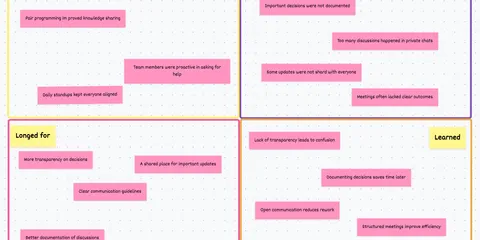
This retrospective gets its name “4L” from the 4 questions asked in the retrospective: “Liked” (What did the team like about the last sprint?) “Lacked” (What shortcomings were there in the last sprint?) “Longed for” (What things did the team wish for that are not yet available?) and last but not least “Learned” (What did the team learn in the last sprint?)
4L Retrospective Template
4 perspectives in one template
You are welcome to use the following template free of charge in our “Echometer” tool, or use the information for your self-created retros. I will also give you a more detailed explanation and examples for each question, directly below the 4L retrospective template:
4L-Retro 📘: How the retro works
-
Random Icebreaker (2-5 minutes)
Echometer provides you with a generator for random check-in questions.
-
Review of open actions (2-5 minutes)
Before starting with new topics, you should talk about what has become of the measures from past retrospectives to check their effectiveness. Echometer automatically lists all open action items from past retros.
-
Discuss retro topics
Use the following open questions to collect your most important findings. First, everyone does it themselves, covered. Echometer allows you to reveal each column of the retro board individually in order to then present and group the feedback.
- Like: What did you like?
- Learned: What did you learn?
- Lacked: What did you lack?
- Longed for: What did you long for?
-
Catch-all question (Recommended)
So that other topics also have a place:
- What else would you like to talk about in the retro?
-
Prioritization / Voting (5 minutes)
On the retro board in Echometer, you can easily prioritize the feedback with voting. The voting is of course anonymous.
-
Define actions (10-20 minutes)
You can create a linked action via the plus symbol on a feedback. Not sure which measure would be the right one? Then open a whiteboard on the topic via the plus symbol instead to brainstorm root causes and possible measures.
-
Checkout / Closing (5 minutes)
Echometer enables you to collect anonymous feedback from the team on how helpful the retro was. This creates the ROTI score ("Return On Time Invested"), which you can track over time.
4L-Retro 📘

Liked: The question about “Liked” is actually not as simple as it seems. It’s about how you experienced the sprint during and after the sprint. In this retrospective, I would like to encourage the team to think about both. What has changed in retrospect? What was important or unimportant during the sprint? Or does the perception match?
4L Retrospective Template “Liked” Example:
- The new feature in our software was exciting to implement. It was fun, but the impact was not that great.
- I had a face-to-face meeting with a team member that turned out to be very useful for our collaboration. At the beginning I thought it was a waste of time, but in the end it wasn’t.
- The pace of work in this sprint has been pleasant and I am proud of our performance in the last two weeks. We have accomplished a lot and achieved good results.
Lacked: When it comes to “Lacked”, the question is: “What shortcomings did we have during the sprint?”. This refers to the fact that something was missing in the last sprint. A thing or a circumstance that could have been produced and should also be produced in the upcoming sprint cycle.
4L Retrospective Template “Lacked” Example:
- I had too many tasks and too little time. That made me very stressed and overwhelmed.
- We tried new features without knowing what they would do. This was very annoying and confusing.
Longed for: There is a big difference between “Lacked” and “Longed for” even though they sound similar. “Lacked” are the things that weren’t there before and that you can change quickly, and “Longed for” are the things that you and your team would like to have and achieve in the future. So the question behind “Longed for” is “What wishes does the team have that are not yet fulfilled?”.
4L Retrospective Template “Longed for” Example:
- I wish we could get more feedback from our customers to know if our software meets their needs. This would help us to better set our priorities and improve our quality.
- It would be nice if we had more room for innovation and experimentation, to explore and learn new possibilities. That would spur us to be more creative and develop new solutions.
Learned: “Learned” can also be viewed from two different perspectives. Because you can learn both from your sprint and from the points discussed so far (Like, Lacked, Longed for). This is also the reason why the question “What can we learn?” is always gladly asked at the end of this retrospective.
4L Retrospective Template “Learned” Example:
- Better structure in problem reporting can contribute to higher quality in resolution.
- When conflicts arise between two team members, it is advisable to resolve them quickly. This way, you can avoid the conflicts escalating and causing more trouble.
4L Retrospective Template
Conclusion - 4L Retrospective Template:
The 4L retrospective can ask more than just 4 simple questions, as you can see from the examples. I don’t want to complicate the questions unnecessarily, but it is important to take advantage of the depth that this retrospective offers. To do this, it is helpful to explain the 4L’s in more detail to team members or to be more specific about the questions behind the 4L’s. For example, “Longed for” -> “What desires does the team have that have not yet been met?”
If you would like to browse 26 more templates, this article is just the thing for you: 26 Refreshing Agile Retrospective Templates in 2026