
3 Free Sprint Retrospective PowerPoint Templates
Are you searching Google for “Sprint Retrospective PowerPoint Template”? Then you’ve come to the right place🎉
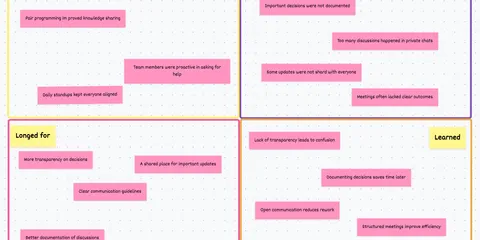
I’ll provide you with some examples of Sprint Retrospective Meetings that you can easily insert into Powerpoint. These templates can be used not only in Powerpoint, but also in e.g. Word, Excel or for the best experience in our own tool “Echometer”⚡
Sprint Retrospective PowerPoint Template
PowerPoint for Retrospectives:
Personally, I find it very interesting that I’ve often heard that people are interested in PowerPoint templates for Sprint retrospectives, but honestly I didn’t really understand until today, warum🤷🏽♂️
Don’t get me wrong, there are a million ways to run a good retrospective - for example, we started with a simple whiteboard, which isn’t that different from a blank PowerPoint presentation thrown on the wall.
But from the moment I knew that there are tools that allow a much better retrospective than PowerPoint or even whiteboards, I didn’t hesitate to use them. In the case of Echometer, you can even try it for free and risk-free🚀.
That means you can also try our examples right now in Echometer by clicking on the button (no registration required)✅.
Sprint Retrospective PowerPoint Template
1. The Start Stop Keep Retrospective 🔖:
Let’s start with a classic method. The Start-Stop-Keep retrospective asks three simple questions about what your team should start, stop, and maintain in the next sprint.
Since we have found that it is easiest to start the retrospective with the question “What should be kept”, we usually make this retrospective the “Keep Stop Start” retrospective✨
Keep stop start retro: How the retro works
-
Random Icebreaker (2-5 minutes)
Echometer provides you with a generator for random check-in questions.
-
Review of open actions (2-5 minutes)
Before starting with new topics, you should talk about what has become of the measures from past retrospectives to check their effectiveness. Echometer automatically lists all open action items from past retros.
-
Discuss retro topics
Use the following open questions to collect your most important findings. First, everyone does it themselves, covered. Echometer allows you to reveal each column of the retro board individually in order to then present and group the feedback.
- Keep: What should we keep?
- Stop: What should we stop doing?
- Start: What should we start doing?
-
Catch-all question (Recommended)
So that other topics also have a place:
- What else would you like to talk about in the retro?
-
Prioritization / Voting (5 minutes)
On the retro board in Echometer, you can easily prioritize the feedback with voting. The voting is of course anonymous.
-
Define actions (10-20 minutes)
You can create a linked action via the plus symbol on a feedback. Not sure which measure would be the right one? Then open a whiteboard on the topic via the plus symbol instead to brainstorm root causes and possible measures.
-
Checkout / Closing (5 minutes)
Echometer enables you to collect anonymous feedback from the team on how helpful the retro was. This creates the ROTI score ("Return On Time Invested"), which you can track over time.
Keep stop start retro

Sprint Retrospective PowerPoint Template
2. The Mad Sad Glad Retrospective 😯:
The “Mad Sad Glad” retrospective follows a similar pattern, but uses three common emotions to move the team to answer your retrospective questions. A fairly simple, but fascinating retrospective format:
Mad Sad Glad Retro 😯: How the retro works
-
Random Icebreaker (2-5 minutes)
Echometer provides you with a generator for random check-in questions.
-
Review of open actions (2-5 minutes)
Before starting with new topics, you should talk about what has become of the measures from past retrospectives to check their effectiveness. Echometer automatically lists all open action items from past retros.
-
Discuss retro topics
Use the following open questions to collect your most important findings. First, everyone does it themselves, covered. Echometer allows you to reveal each column of the retro board individually in order to then present and group the feedback.
- What made you mad? 😤
- What made you sad? 😢
- What made you glad? 🤩
-
Catch-all question (Recommended)
So that other topics also have a place:
- What else would you like to talk about in the retro?
-
Prioritization / Voting (5 minutes)
On the retro board in Echometer, you can easily prioritize the feedback with voting. The voting is of course anonymous.
-
Define actions (10-20 minutes)
You can create a linked action via the plus symbol on a feedback. Not sure which measure would be the right one? Then open a whiteboard on the topic via the plus symbol instead to brainstorm root causes and possible measures.
-
Checkout / Closing (5 minutes)
Echometer enables you to collect anonymous feedback from the team on how helpful the retro was. This creates the ROTI score ("Return On Time Invested"), which you can track over time.
Mad Sad Glad Retro 😯

Sprint Retrospective PowerPoint Template
3. The Campfire Retrospective 🔥:
Who doesn’t like to sit in front of a warm fire and think about the past and the future? – I would not recommend lighting a fire in the office, but for that we have created this beautiful campfire retrospective:
Campfire Retrospective 🔥: How the retro works
-
Random Icebreaker (2-5 minutes)
Echometer provides you with a generator for random check-in questions.
-
Review of open actions (2-5 minutes)
Before starting with new topics, you should talk about what has become of the measures from past retrospectives to check their effectiveness. Echometer automatically lists all open action items from past retros.
-
Discuss retro topics
Use the following open questions to collect your most important findings. First, everyone does it themselves, covered. Echometer allows you to reveal each column of the retro board individually in order to then present and group the feedback.
- Warm fire: What made you feel good in the last sprint?
- Turned to ashes: What did not work as desired and crumbled to ashes?
- The shooting star: What do you wish for the future?
-
Catch-all question (Recommended)
So that other topics also have a place:
- What else would you like to talk about in the retro?
-
Prioritization / Voting (5 minutes)
On the retro board in Echometer, you can easily prioritize the feedback with voting. The voting is of course anonymous.
-
Define actions (10-20 minutes)
You can create a linked action via the plus symbol on a feedback. Not sure which measure would be the right one? Then open a whiteboard on the topic via the plus symbol instead to brainstorm root causes and possible measures.
-
Checkout / Closing (5 minutes)
Echometer enables you to collect anonymous feedback from the team on how helpful the retro was. This creates the ROTI score ("Return On Time Invested"), which you can track over time.
Campfire Retrospective 🔥

Sprint Retrospective PowerPoint Template
Conclusion - 3 Free Sprint Retrospective PowerPoint Templates⚡
As you can see, I’ve shown you 3 examples of templates that you can easily screenshot into your PowerPoint or other application of your choice.
Fancy 22 more Retrospective Templates?
👉🏽 26 refreshing Agile Retrospective Templates in 2026.
To quick-start these retrospectives, you can use Echometer, where you can prepare a whole retrospective agenda in less than 1 minute.
If you want to take a closer look at what’s part of my personal favorite retrospective agenda, you can read my blog article on it here:
👉🏽 Easy to use sprint retrospective meeting agenda template.

"Many team members are afraid to speak up!"
Solve this challenge
"We discover too many unexpected issues & bugs at a late stage!"
Solve this challenge
"Why does it sometimes take me hours to prepare a simple retrospective?"
Solve this challenge