
Sprint Refinement vs Sprint Retrospective: Explained Simply
I am a Scrum Master and psychologist and have moderated over 200 retrospectives. I sometimes hear one question: What belongs in Sprint Refinement and what belongs in the Sprint Retrospective? That is exactly what I clarify here in a practical way.
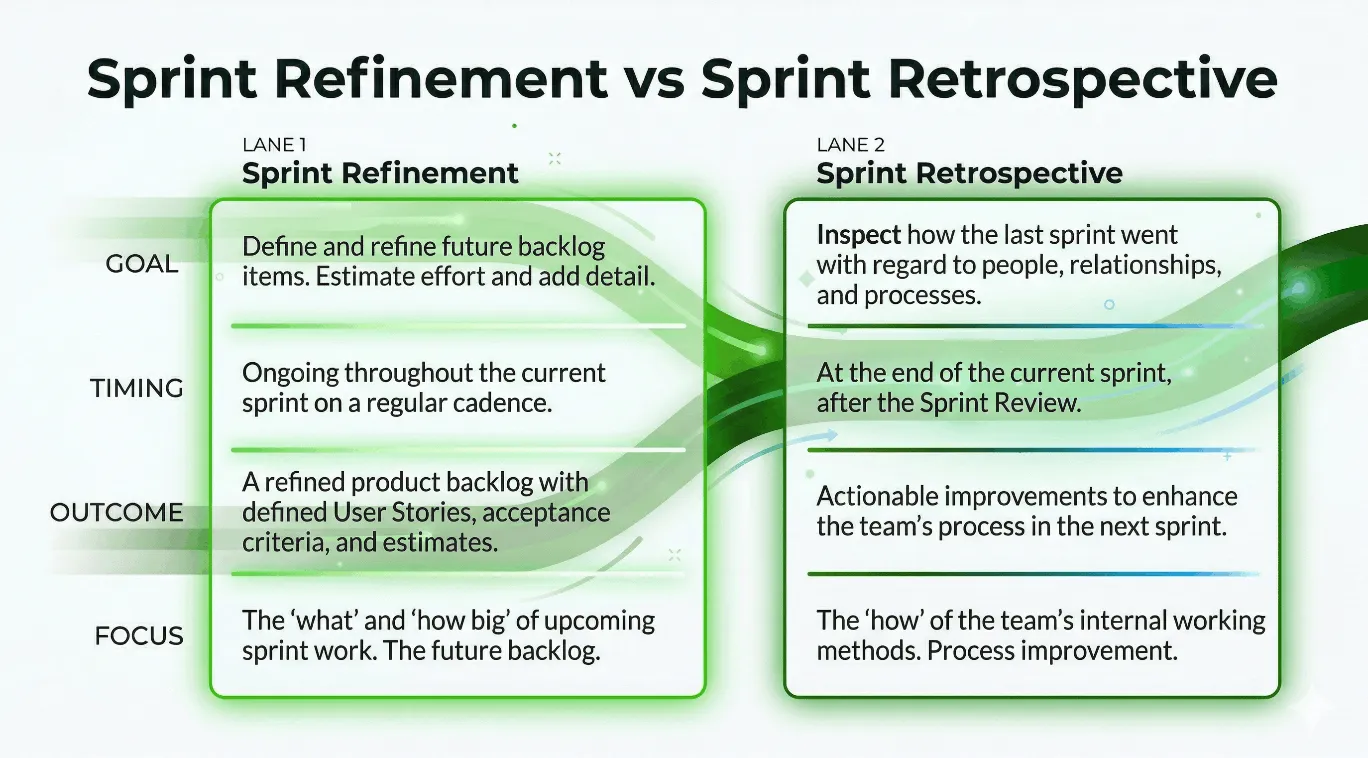
Sprint Refinement vs Sprint Retrospective in 20 seconds
| Question | Sprint Refinement | Sprint Retrospective |
|---|---|---|
| What is it about? | Sharpening next work | Improving collaboration |
| Direction of view | Looking forward | Looking back and learning |
| Result | Clearer backlog items | Concrete measures |
| Focus | What are we building next? | How do we work better in the next sprint? |
What is a Sprint Refinement?
In a Sprint Refinement, my team clarifies open requirements, breaks down large tickets into smaller ones, and makes the backlog actionable. For me, a Sprint Refinement is the preparation for good sprint decisions in the Planning.
What is a Sprint Retrospective?
In the Sprint Retrospective, we look at collaboration, process, and learning points from the last sprint. The goal is no longer ticket detail, but better teamwork with clear action items.
Sprint Refinement vs Sprint Retrospective: What is the difference?
The core of Sprint Refinement vs Sprint Retrospective is the object of decision:
- In Refinement, the team decides on work content.
- In the Retrospective, the team decides on the way of working.
If you separate Sprint Refinement vs Sprint Retrospective cleanly, focus and quality of results almost always increase visibly.
Practical Example 1
A team suddenly discusses in the retro whether a ticket is too large. The session becomes long, but there is no improvement measure.
What needs to be changed here:
- Move ticket sharpening back into Refinement.
- In the retro, only clarify the process question: Why do unclear tickets even enter the sprint?
Practical Example 2
A team uses Refinement like a mini-planning with commitments. In the Planning, clarity is still missing.
What needs to be changed here:
- Separate Refinement as preparation and Planning as commitment.
- Use the Retrospective to improve recurring coordination problems.
Common confusions around Sprint Refinement vs Sprint Retrospective
Sprint Planning vs Sprint Refinement
Refinement prepares, Planning decides the sprint commit.
Sprint Review vs Sprint Retrospective
Review focuses on product increment and stakeholder feedback, Retrospective focuses on team process and improvements.
Backlog Refinement vs Sprint Planning
Backlog Refinement makes options actionable, Sprint Planning selects the sprint plan from them.
As an external deep dive into Scrum Events, I often use the short explanations from Scrum.org and Atlassian.
Sprint Refinement vs Sprint Retrospective: Which question fits when?
| Situation | Rather use Refinement questions | Rather use Retrospective questions |
|---|---|---|
| Stories too large/unclear | ”What is missing for actionability?” | |
| Priorities unclear | ”What is really important in the next sprint?” | |
| Recurring friction | ”What is slowing down our collaboration?” | |
| Measures are left undone | ”Which one measure do we commit to until the next retro?” | |
| Too many surprises | ”Which risk could we have seen earlier?" | "Why do we see this risk too late?” |
My rule in Sprint Refinement vs Sprint Retrospective: If the core question is “What are we building next?”, it is Refinement. If it is “How do we become better as a team?”, it is Retrospective.
2 Good Retrospective Ideas for Beginners
Keep Stop Start
If you want to start with a simple and clear structure, Keep Stop Start is often the best choice. This method helps beginners to quickly move from observations to concrete measures.
Keep Stop Start Retro: How the retro works
-
Random Icebreaker (2-5 minutes)
Echometer provides you with a generator for random check-in questions.
-
Review of open actions (2-5 minutes)
Before starting with new topics, you should talk about what has become of the measures from past retrospectives to check their effectiveness. Echometer automatically lists all open action items from past retros.
-
Discuss retro topics
Use the following open questions to collect your most important findings. First, everyone does it themselves, covered. Echometer allows you to reveal each column of the retro board individually in order to then present and group the feedback.
- Keep: What should we keep doing?
- Stop: What should we stop doing?
- Start: What should we start doing?
-
Catch-all question (Recommended)
So that other topics also have a place:
- What else would you like to talk about in the retro?
-
Prioritization / Voting (5 minutes)
On the retro board in Echometer, you can easily prioritize the feedback with voting. The voting is of course anonymous.
-
Define actions (10-20 minutes)
You can create a linked action via the plus symbol on a feedback. Not sure which measure would be the right one? Then open a whiteboard on the topic via the plus symbol instead to brainstorm root causes and possible measures.
-
Checkout / Closing (5 minutes)
Echometer enables you to collect anonymous feedback from the team on how helpful the retro was. This creates the ROTI score ("Return On Time Invested"), which you can track over time.
Keep Stop Start Retro

Spotify Health Check Retro
If your team wants to recognize patterns in collaboration rather than just individual problems, this method is particularly helpful. It gives you a broader picture of team dynamics and development in a short amount of time.
Team Retrospective with Spotify Health Check: How the retro works
-
Random Icebreaker (2-5 minutes)
Echometer provides you with a generator for random check-in questions.
-
Review of open actions (2-5 minutes)
Before starting with new topics, you should talk about what has become of the measures from past retrospectives to check their effectiveness. Echometer automatically lists all open action items from past retros.
-
Health Check
All team members can answer the health checks anonymously on a scale. Then go through the results of the health checks together and record any additional comments if necessary. If you use the same health checks in several retrospectives, you can also track trends over time in Echometer.
- We enjoy going to work and have a lot of fun working together.
- We always get great support and help when we ask for it.
- We are a great team that works together wonderfully.
- We are constantly learning many interesting things.
-
Discuss retro topics
Use the following open questions to collect your most important findings. First, everyone does it themselves, covered. Echometer allows you to reveal each column of the retro board individually in order to then present and group the feedback.
-
Catch-all question (Recommended)
So that other topics also have a place:
- What else would you like to talk about in the retro?
-
Prioritization / Voting (5 minutes)
On the retro board in Echometer, you can easily prioritize the feedback with voting. The voting is of course anonymous.
-
Define actions (10-20 minutes)
You can create a linked action via the plus symbol on a feedback. Not sure which measure would be the right one? Then open a whiteboard on the topic via the plus symbol instead to brainstorm root causes and possible measures.
-
Checkout / Closing (5 minutes)
Echometer enables you to collect anonymous feedback from the team on how helpful the retro was. This creates the ROTI score ("Return On Time Invested"), which you can track over time.
Team Retrospective with Spotify Health Check
Health Check Questions (Scale)

You can find more methods here: Retrospective Methods . For better starts, I recommend the post Retrospective Check-in . For the implementation of action items, see Retrospective Measures .
Why Echometer is the perfect start
If teams want to clearly separate Sprint Refinement vs Sprint Retrospective, a clear workflow helps. Echometer is ideal for this because you start directly with structured templates for your retrospective, track measures, and make team development visible. Note: Echometer is not for refinement, but specialized in effective retrospectives.
If you want to measure team development in addition to retros, also take a look at our landing page for Team Health Check Software .
If you are looking for a moderation guide, you can find our eBook with tips for retro moderation.
Conclusion
Sprint Refinement vs Sprint Retrospective can be easily separated if you keep the focus clear: Refinement sharpens the next work, the retrospective improves your collaboration. If you apply this logic cleanly, both meetings will become shorter, clearer, and significantly more effective.
FAQ from our library
Who takes part in a retrospective?
A retrospective typically takes place at the team level. Usually, such agile teams have at least 3 members and up to 10 members. So all team members participate in the retrospective - regardless of the respective role of the team members within the team.
Whether the team leader counts as a team member depends on the context and must ultimately be decided by the team itself. The more involved team leaders are in the team’s day-to-day work, the more sense it makes for them to also take part in the team’s retrospectives.
A moderator should be appointed to ensure that the process runs as smoothly and efficiently as possible. This task can be performed by the Scrum Master, for example, but also by another team member. You may also simply rotate the moderation role within the team – everyone takes turns in a certain order.
Which steps are part of a retrospective?
Typically, there are five phases for retrospectives: Set the stage, Gather data, Generate insights, Decide what to do, and Close. The exact process can vary, but it should always lead to concrete action items. In addition to the classic 5 phases of retrospectives, there is also the Double Diamond model for the phases of retrospectives , which provides facilitators of retrospectives with a more intuitive image for successful and result-oriented facilitation.
How do you measure the success of a retrospective?
The success of retrospectives is reflected in the fact that agreed measures are implemented and measurable improvements are achieved. In addition to productivity indicators (which should be treated with caution), teams use, for example, the tracking of action items, trends on feedback scales in team health check / pulse check surveys.