How To: Effective Sprint Retrospective Meetings with 5 Tips
I have participated in more than 200 agile retrospectives and facilitated many of them. As a psychologist and Scrum Master, I keep seeing the same problem: many teams talk well, but improve too little.
This guide shows how I set up effective Sprint Retrospective meetings so that something actually changes in the next sprint.
Why effective Sprint Retrospective meetings fail so often
The most common reasons are:
- too many topics at once
- no clear prioritization
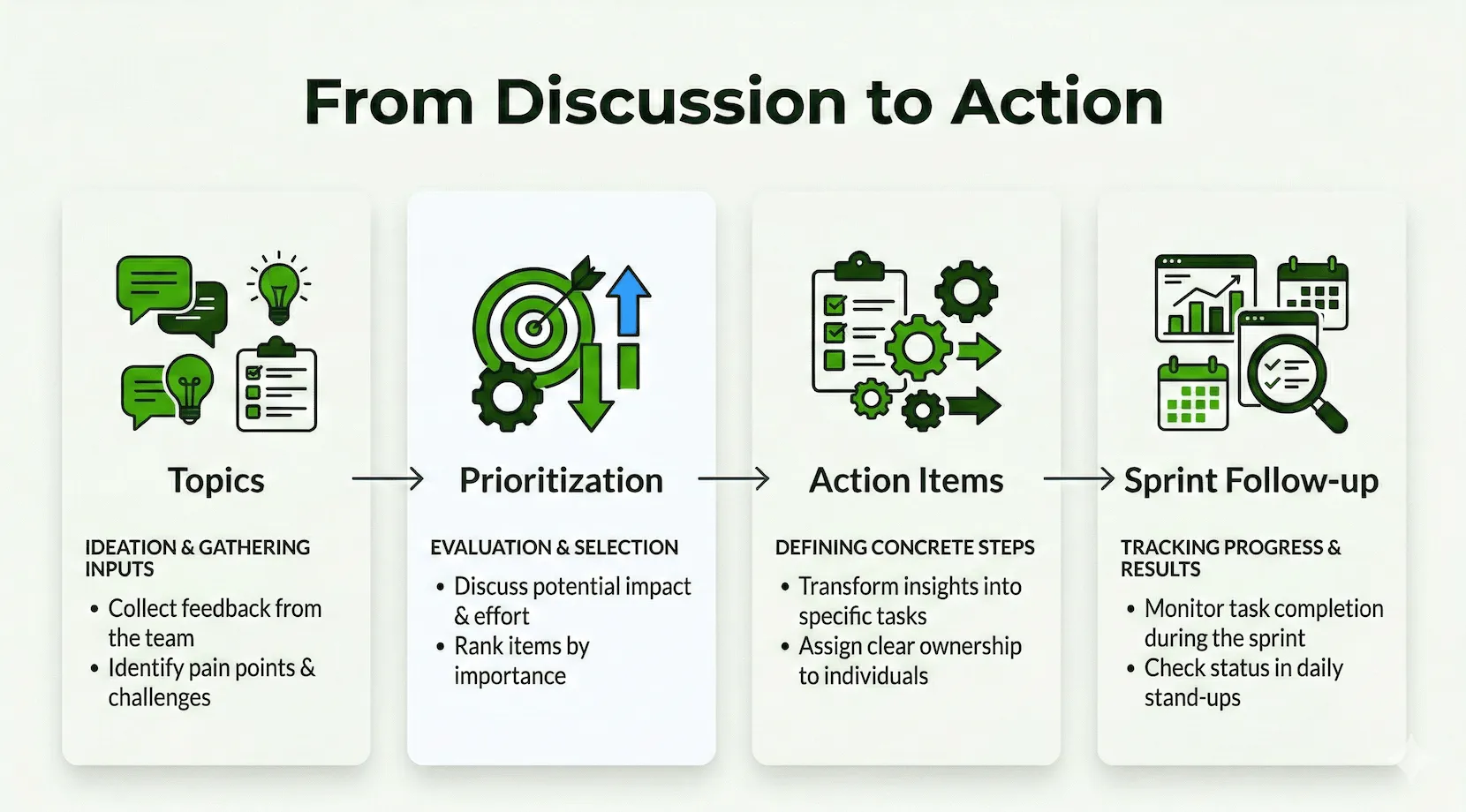
- no binding action items
- no follow-up in the next sprint
For me, the crucial point is: a good retro is only successful when concrete improvements become visible in the next sprint.
Sprint Retrospective Process: the 5 steps readers usually look for first
When teams search for effective Sprint Retrospective meetings, they usually want a clear process first. This is my compact standard:
- Set the stage: Briefly clarify the goal and focus of the retro.
- Gather data: Make observations from the sprint visible.
- Generate insights: Identify patterns and bottlenecks together.
- Decide what to do: Define a maximum of 1 to 2 concrete action items.
- Close and follow-up: Finalize owner, deadline, and success criterion.
How-to: Effective Sprint Retrospective Meetings with 5 Tips
Tip 1: Start with a clear guiding question
I almost always start with a relaxed check-in question:
Which word best describes the last sprint?
This immediately creates focus and makes effective Sprint Retrospective meetings more concrete.
Tip 2: Collect facts first, then opinions
I separate observation and evaluation:
- What happened?
- Where was there friction?
- What helped us?
This reduces blame dynamics and increases psychological safety.
Tip 3: Use the Spotify Squad Health Check Radar
When teams discuss in vague terms, I use the Spotify template from the Echometer library.
Spotify Squad Health Check Radar: How the retro works
-
Random Icebreaker (2-5 minutes)
Echometer provides you with a generator for random check-in questions.
-
Review of open actions (2-5 minutes)
Before starting with new topics, you should talk about what has become of the measures from past retrospectives to check their effectiveness. Echometer automatically lists all open action items from past retros.
-
Health Check
All team members can answer the health checks anonymously on a scale. Then go through the results of the health checks together and record any additional comments if necessary. If you use the same health checks in several retrospectives, you can also track trends over time in Echometer.
- We regularly deliver value to our users.
- Our technical quality supports fast changes.
- We work together as a team with trust and transparency.
- Our focus is clear and priorities are stable.
- We learn systematically from mistakes and experiments.
-
Discuss retro topics
Use the following open questions to collect your most important findings. First, everyone does it themselves, covered. Echometer allows you to reveal each column of the retro board individually in order to then present and group the feedback.
- Which dimension has improved the most since the last measurement?
- Where do we currently see the biggest bottleneck and why?
- Which 1 to 3 measures will we bindingly implement by the next retro?
-
Catch-all question (Recommended)
So that other topics also have a place:
- What else would you like to talk about in the retro?
-
Prioritization / Voting (5 minutes)
On the retro board in Echometer, you can easily prioritize the feedback with voting. The voting is of course anonymous.
-
Define actions (10-20 minutes)
You can create a linked action via the plus symbol on a feedback. Not sure which measure would be the right one? Then open a whiteboard on the topic via the plus symbol instead to brainstorm root causes and possible measures.
-
Checkout / Closing (5 minutes)
Echometer enables you to collect anonymous feedback from the team on how helpful the retro was. This creates the ROTI score ("Return On Time Invested"), which you can track over time.
Spotify Squad Health Check Radar
Health Check Questions (Scale)
Open questions

Tip 4: Prioritize a maximum of 1 to 2 action items
Teams rarely fail due to a lack of ideas, but rather due to overload. For effective Sprint Retrospective meetings, I prioritize hard and keep the scope small.
Tip 5: Measure impact in the next sprint
I check during the follow-up:
- Was the measure implemented?
- How do we see improvement?
- What do we keep, what do we stop?
Without this loop, effective Sprint Retrospective meetings remain just good conversations.
Second template for quick Sprint Retrospectives
When time is short, I use Start-Stop-Continue:
Start-Stop-Continue: How the retro works
-
Random Icebreaker (2-5 minutes)
Echometer provides you with a generator for random check-in questions.
-
Review of open actions (2-5 minutes)
Before starting with new topics, you should talk about what has become of the measures from past retrospectives to check their effectiveness. Echometer automatically lists all open action items from past retros.
-
Discuss retro topics
Use the following open questions to collect your most important findings. First, everyone does it themselves, covered. Echometer allows you to reveal each column of the retro board individually in order to then present and group the feedback.
- What should we start in the next sprint?
- What should we stop?
- What should we keep?
-
Catch-all question (Recommended)
So that other topics also have a place:
- What else would you like to talk about in the retro?
-
Prioritization / Voting (5 minutes)
On the retro board in Echometer, you can easily prioritize the feedback with voting. The voting is of course anonymous.
-
Define actions (10-20 minutes)
You can create a linked action via the plus symbol on a feedback. Not sure which measure would be the right one? Then open a whiteboard on the topic via the plus symbol instead to brainstorm root causes and possible measures.
-
Checkout / Closing (5 minutes)
Echometer enables you to collect anonymous feedback from the team on how helpful the retro was. This creates the ROTI score ("Return On Time Invested"), which you can track over time.
Start-Stop-Continue

This allows me to move from discussion to decision in a short time, which is crucial for effective Sprint Retrospective meetings.
How I measure effective Sprint Retrospective meetings
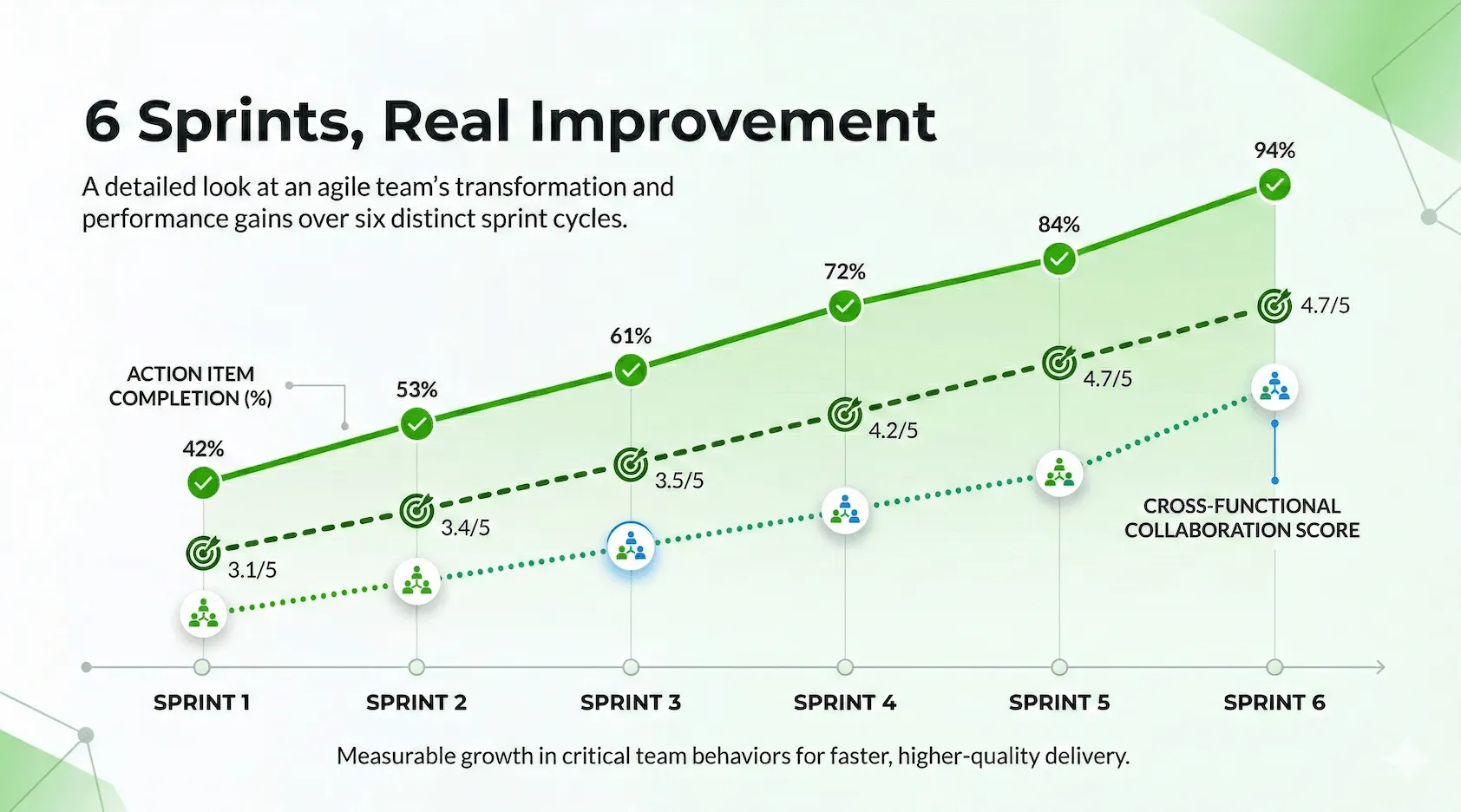
Instead of gut feeling, I look at simple, repeatable signals:
- Completion rate of action items
- Number of open measures from past retros
- Development of Team Health Check scores over several sprints
- Perceived clarity of priorities within the team
These metrics do not replace good facilitation, but they reliably show whether effective Sprint Retrospective meetings are actually creating impact in everyday work.
In-depth resources (internal and external)
For practical facilitation, I always link to these three guides:
- Retrospective methods: choosing formats to match the team’s problem
- Retrospective check-in: better icebreakers for more participation
- Retrospective measures: from ideas to implemented action items
Additionally, these external sources are helpful:
Why I recommend Echometer for Scrum and beyond
Echometer is suitable for teams that want to establish effective sprint retrospective meetings not just once, but permanently:
- fast facilitation with a clear structure
- combinable retro and health check templates
- action item tracking across sprints
- usable in Scrum, Kanban, and cross-departmental setups
If you would like to compare:
FAQ: Effective Sprint Retrospective Meetings
Which steps are part of a retrospective?
Typically, there are five phases for retrospectives: Set the stage, Gather data, Generate insights, Decide what to do, and Close. The exact process can vary, but it should always lead to concrete action items. In addition to the classic 5 phases of retrospectives, there is also the Double Diamond model for the phases of retrospectives , which provides facilitators of retrospectives with a more intuitive image for successful and result-oriented facilitation.
Who takes part in a retrospective?
A retrospective typically takes place at the team level. Usually, such agile teams have at least 3 members and up to 10 members. So all team members participate in the retrospective - regardless of the respective role of the team members within the team.
Whether the team leader counts as a team member depends on the context and must ultimately be decided by the team itself. The more involved team leaders are in the team’s day-to-day work, the more sense it makes for them to also take part in the team’s retrospectives.
A moderator should be appointed to ensure that the process runs as smoothly and efficiently as possible. This task can be performed by the Scrum Master, for example, but also by another team member. You may also simply rotate the moderation role within the team – everyone takes turns in a certain order.
How do you measure the success of a retrospective?
The success of retrospectives is reflected in the fact that agreed measures are implemented and measurable improvements are achieved. In addition to productivity indicators (which should be treated with caution), teams use, for example, the tracking of action items, trends on feedback scales in team health check / pulse check surveys.