Category
5. My account (4 Article)
For all questions about your personal access
Delete my account
To delete your account, first log in to the Echometer app: https://my.echometerapp.com/
Tips
- If you do not know which email address you used to create your account, check your email inbox to see which email address you received the Echometer notifications. Use this email address for login.
- If you no longer have access to your password, click “Request login link”. You will then receive an email with a link that logs you directly into Echometer.
Once you are logged in, click on your name in the upper left corner and then click “Account Settings”:
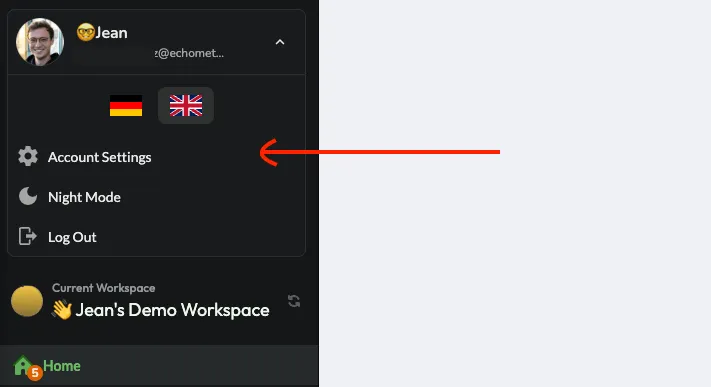
In the account settings, scroll down to the “Danger Zone” and click “Delete Account”:

To confirm the deletion, you will be asked to enter your password again.
Can I delete my account if no password is set?
Yes. If you don’t have a password, or don’t know it, you can simply set a new password under “Password” in the account settings and use it directly to confirm the deletion of the account.
If you have problems with deleting your account, please contact us via support [at] echometer.com.
Change the language in Echometer
Echometer is currently available in German and English. Here is how you can change the language:
In the menu
Simply move the mouse over your username in the upper left corner and then select the desired language in the menu:

In the survey
To change the language in the survey, simply click on the language in the upper right corner:

Note: When the team admin sends out the survey, the language selected at the time will be used for the email and the survey, provided that the recipients themselves have not yet selected a language in Echometer or are not yet registered in Echometer.
In the retro
In the retro you change the language by clicking on the three dots in the top right and then choose the language accordingly:

Customize name and profile picture
Open your account settings by hovering your mouse over your name and email address in the menu bar at the top left and select the entry in the list.

Here you can upload a profile picture and change your name:

Tip: You can also change your name in a retro by moving over to your entry in the list of participants in the sidebar on the right and clicking the edit button:

Reset my password
If you are logged into your Echometer account and want to change your password, you can do this via your account settings. You can find this by moving your mouse over your name and email address in the menu bar at the top left and selecting the entry in the list.
Here you can enter and save your new password:

Forgot your password and can’t access your account?
Also no problem. When logging in, simply use the option to generate a “login link” by clicking on “Forgot password” after entering your email address:

Echometer will then immediately send you a link with which you can set a new password for your account.
If you have not received the email within 5 minutes, please contact support [at] echometer.de