
7 tips for your agile retrospective meeting agenda
If you’re new to the world of Agile or looking to spice up your existing retro meetings, I’d like to share some tips and insights on creating an effective agenda for Agile retrospectives.
While the benefits of conducting retros are probably clear, a clear and well-planned retrospective agenda is important to ensure the meeting is productive and actionable. If the benefits of a retrospective are not clear to you, perhaps take a look at this article first: 23 Agile statistics for 2023
A clear purpose for the retrospective is critical because it provides a framework for the discussion and helps keep the team focused on what’s important. Without a clear purpose, the meeting can quickly become unfocused and unproductive.
So how do you determine the purpose of your retrospective? Here are three basic tips:
Start with the goals of your sprint: Look at what the team wanted to accomplish in the last sprint and identify the areas that may need improvement. This way you can narrow down the focus of your retrospective.
Involve the team: The retro is a team effort, so it is important to involve everyone in the goal-setting process. Encourage team members to contribute their thoughts and ideas.
Keep it simple: Your purpose statement should be clear and concise. Avoid jargon or technical terms that may be confusing to some team members. Exception: You know your team and the team members very well. know, that they know the terms used in any case.
By taking the time to define the purpose of your retrospective, you can ensure that everyone involved is on the same page and working toward a common goal. This makes it easier to create a well-planned retrospective that addresses the needs of the team and sets them up for future success.
Best practice agenda for agile retrospectives
An effective agenda for a retrospective has a clear structure that serves as a common thread for the session and ensures that all necessary topics are covered. I have briefly summarized some of the most important and most frequently used elements for creating a retrospective agenda here:
Check in
Begin the session by welcoming all participants and briefly explaining the purpose and goals of the retrospective. This is also the perfect moment to check the mood and energy of the team. You can use one of our check-in games for this, for example. You can find an overview of check-in games in this post: The 15 best online retrospective games .
Action Item Review
The most important thing about this step is reflecting on the team’s last action items and, in the best case, checking them off. This promotes accountability and, most importantly, a sense of accomplishment for the team.
Collect data
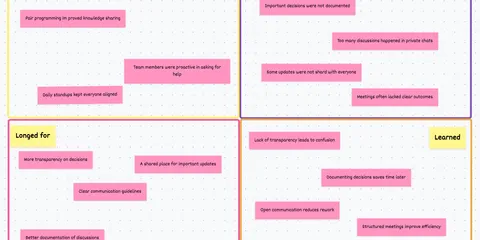
This is where the team takes a look back at the past sprint and discusses what went well, what didn’t and why. It is important to encourage honest and open feedback in this part of the meeting so that everyone can learn from their mistakes and successes.
There are many different pre-made formats for this step of a retro agenda that you can use depending on your team’s needs and preferences. Here are a few examples:


Gain knowledge
Once the team has discussed the previous sprint, the focus should be on identifying the key issues that need to be addressed. These may be process or communication issues, technical problems, or other challenges the team is facing. Once the most critical issues have been identified, the team should begin brainstorming possible solutions. This is where creativity and collaboration are needed. Encourage everyone to share their ideas and work together to find practical and effective solutions.
Action Plan
Finally, the team should create an action plan that describes the steps to solve the problems discussed in the retrospective, the action items. This plan should include specific tasks, timelines if applicable, and definitely responsibilities. If you want to know a bit more about action items, I can recommend the following article: Define good action items in retrospectives .
Since these are typical steps in any retrospective, our tool includes Echometer embedded this agenda for agile retrospectives in the form of easy-to-follow steps.
In addition to a well-planned retrospective meeting agenda, there are other tips and best practices that can help you conduct a productive retrospective. Here are a few you can keep in mind:
Create a safe and open environment: It is important to create an environment where all team members feel comfortable sharing their honest opinions and feedback. One way to do this is to set ground rules for the meeting and remind everyone to communicate respectfully and listen actively. If you’re not sure what these rules might look like or how to implement them, feel free to take a look at this article: 10 easy and important ground rules for an agile retrospective .
Encourage everyone to participate: To ensure that all team members feel engaged and involved in the process, it is important to encourage everyone to participate. This means letting everyone have their say, asking for feedback even from those who are silent, and making sure all ideas are heard. To ensure that everyone participates in the meeting, there are two ways to do this:
- Sending a survey
Before the meeting, send out a survey asking team members for their feedback on the last sprint. This will help identify the most important items that need to be discussed in the meeting. This, by the way, is something that Echometer has already integrated into the retrospective workflow 😉 . - Create a shared document
Create a shared document where all participants can write in the topics they want to discuss in the meeting. This ensures that the ideas of all participants are heard and that the agenda is tailored to the needs of the team. Since we are asked about this by many users, we are working on integrating this feature as well.
Focus on the process: It is important to remember that the retrospective is not about assigning blame or exposing individual team members. Instead, the focus should be on identifying areas where the team can improve its processes, communication and collaboration.
Follow-up on action items: After the retrospective, it is important to follow up on the action items identified during the meeting. This means assigning responsibilities, setting deadlines where necessary, and tracking progress to ensure the team is moving forward in achieving the goals. For more in-depth coverage of the Action Items topic, feel free to check out this article as well: How to successfully implement action items from retrospectives .
Agile retrospective meeting agenda - summary
In summary, creating a successful agile retrospective agenda is essential for any Scrum Master or Team Leader who wants to improve their team’s performance. By following the tips outlined in this blog post, you can create an agenda for retrospectives that is effective and engaging for your team.
In addition to these tips, it’s important to be flexible and adaptable during the meeting. If something isn’t working, don’t be afraid to take a different approach. Always be willing to listen to feedback from your team members and adjust your retro agenda accordingly. In closing, I encourage you to put these tips into practice and experiment with different agile retrospective agendas to find what works best for your team.
Thank you for reading and I wish you every success and lots of fun preparing your next agenda for an agile retrospective!